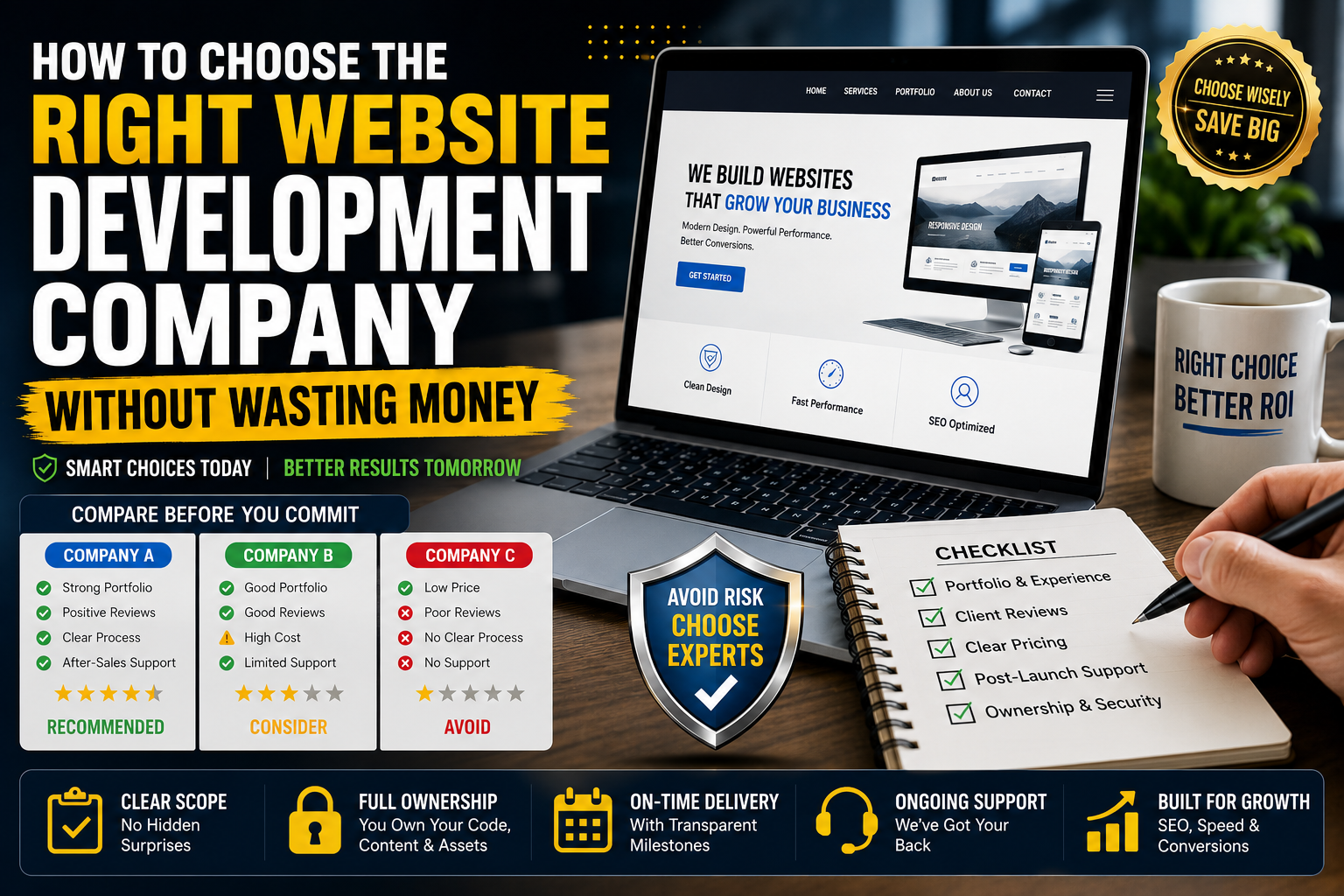
Choosing the right website development company starts with checking its portfolio, client reviews, and experience in building websites similar to yours. Ask for a clear proposal that includes project scope, timeline, technology stack, and total cost—without hidden charges. A reliable company will focus on your business goals, SEO readiness, mobile responsiveness, and long-term support, not just attractive design. Compare at least 3 companies before deciding, and avoid agencies that promise unrealistically low prices or instant Google rankings.
Choosing the wrong website development company doesn’t just cost you money — it costs you months of delays, a site that doesn’t convert, and a redesign you’ll have to pay for all over again. Most business owners lose money not because they picked a “bad” developer, but because they picked a company that was the wrong fit for their project, budget, or stage of growth.
This guide walks you through a practical, no-fluff framework for evaluating website development companies — what to check, what to ask, what to pay, and which red flags mean you should walk away immediately.
Quick Answer: How to Choose a Website Development Company
If you only have two minutes, here’s the short version:
- Define your goals and budget before contacting anyone.
- Shortlist 3–5 companies based on a matching portfolio, not just price.
- Check reviews on independent platforms (Clutch, Google, GoodFirms) — not just testimonials on their own site.
- Ask about post-launch support, ownership of code/assets, and payment milestones.
- Get a written contract with scope, timeline, and revision limits before paying anything.
- Avoid the cheapest and the most expensive quote — compare mid-range options with clear deliverables.
Now let’s go deeper into each step, because the details are where the money gets wasted.
Why People Waste Money on Website Development
Before picking a company, it helps to understand exactly where budgets usually go wrong:
- Unclear scope: The client and agency have different ideas of what’s “included,” leading to costly change requests later.
- Cheapest-bid trap: A rock-bottom quote often means outsourced, undertrained labor, no QA process, and heavy upsells after launch.
- No ownership clause: Some agencies retain rights to the code, design files, or CMS login, forcing you to pay again if you want to leave.
- Missing post-launch plan: The site launches, then breaks, and there’s no support agreement — so you pay emergency rates.
- Mismatched expertise: Hiring a general-purpose agency for a complex e-commerce or SaaS build (or vice versa) leads to rebuilds.
Each of these is preventable with the right vetting process, covered below.
Step 1: Define Your Requirements Before You Talk to Anyone
Agencies price and scope projects based on what you tell them. If your brief is vague, you’ll get vague — and inflated — quotes.
Before reaching out, write down:
- Business goal: Lead generation, e-commerce sales, booking, portfolio, SaaS product, etc.
- Must-have features: Payment gateway, booking system, multi-language, CRM integration, blog/CMS.
- Platform preference (if any): WordPress, Shopify, Webflow, custom code (React/Next.js, Laravel, etc.)
- Timeline: Realistic launch date, not an aspirational one.
- Budget range: Even a rough range helps agencies tell you upfront if you’re a fit.
A clear brief does two things: it filters out agencies that aren’t suited to your project, and it forces every quote you receive to be comparable on equal terms.
Step 2: Shortlist Companies the Right Way
Don’t just Google “website development company near me” and pick the first three results with good ads. Use a layered approach:
Where to look
- Portfolio relevance: Look for 2–3 examples in your industry or with similar complexity — not just visually impressive sites.
- Independent review platforms: Clutch, GoodFirms, and Google Business reviews carry more weight than testimonials posted on the agency’s own website, since they can’t be edited or curated by the agency.
- Referrals: Ask business owners in your network who they used and, more importantly, whether they’d hire them again.
What to evaluate in a portfolio
- Do their past sites still exist and function well today?
- Do they show results (traffic, conversions, load speed) or just screenshots?
- Have they built for your CMS/platform of choice before?
Step 3: Vet Their Expertise and Communication
A strong portfolio doesn’t guarantee a smooth working relationship. Before signing anything, evaluate how they handle sales conversations — because that’s usually the best version of how they’ll treat you as a client.
Ask these questions and pay attention to how directly they answer:
- “Can you walk me through your development process, from kickoff to launch?”
- “Who exactly will work on my project — will it be the person I’m talking to now?”
- “What happens if I want changes mid-project?”
- “How do you handle SEO, page speed, and mobile responsiveness by default?”
- “What’s your typical timeline for a project like mine, and what could delay it?”
Red flags to watch for:
- Vague or evasive answers about who does the actual work (common with resellers who outsource everything).
- Pressure to sign or pay a large deposit within 24–48 hours.
- No questions asked about your business goals — only about your budget.
- Refusal to provide client references you can actually contact.
Step 4: Understand Website Development Pricing (So You Don’t Overpay)
Website costs vary enormously, and the price alone tells you very little. Use these general ranges as a sanity check, not a rulebook.
Pricing by Website Type
| Website Type | Typical Range (USD) | Notes |
| Landing page (1–3 pages) | $300–$1,500 | Single-purpose page, minimal custom design |
| Basic brochure site (5–8 pages) | $1,000–$6,000 | Template or semi-custom design |
| Small business / CMS site | $3,000–$12,000 | WordPress/Webflow, custom design, blog, basic SEO |
| E-commerce store (small–mid) | $5,000–$30,000 | Depends on product count, payment gateways, integrations |
| Enterprise e-commerce | $30,000–$150,000+ | Custom checkout, ERP/inventory integration, multi-currency |
| Custom web application / SaaS | $20,000–$150,000+ | Custom code, databases, user accounts, APIs |
| Ongoing maintenance & support | $50–$500/month | Hosting, backups, security patches, minor updates |
Pricing by Industry
Industry adds its own cost layer because of compliance needs, integrations, and design complexity:
| Industry | Typical Range (USD) | What Drives the Cost |
| Restaurant / local service business | $1,500–$8,000 | Menu/booking system, Google Maps integration, mobile-first design |
| Real estate | $5,000–$25,000 | IDX/MLS integration, property search filters, map-based listings |
| Healthcare / clinics | $6,000–$35,000 | HIPAA-compliant forms, appointment booking, patient portals |
| Legal / professional services | $3,000–$15,000 | Case study pages, intake forms, strong trust/EEAT-focused content |
| E-commerce / retail brands | $5,000–$50,000+ | Product catalog size, payment gateways, inventory sync |
| SaaS / tech startups | $15,000–$120,000+ | Custom dashboards, user authentication, third-party API integrations |
| Finance / fintech | $20,000–$150,000+ | Security audits, regulatory compliance, encrypted data handling |
| Education / e-learning | $8,000–$60,000 | Course platforms, video hosting, student login systems |
| Hospitality / travel | $6,000–$40,000 | Booking engines, payment processing, multi-language support |
Why the cheapest quote is often the most expensive in the end: agencies quoting far below market rate typically cut corners on testing, security, and mobile optimization — costs that resurface later as a redesign or emergency fix.
Why the most expensive quote isn’t automatically the best: premium pricing sometimes reflects brand overhead and sales commissions rather than better engineering. Always ask what specifically justifies the price difference between quotes.
Pricing for AI-Built Websites (After the Site Is Built with AI Tools)
AI website builders (like Wix ADI, Framer AI, 10Web AI, Durable, or custom AI-assisted development) have changed the cost structure, but they haven’t eliminated cost — they’ve shifted it toward setup, customization, and human refinement. Here’s what pricing typically looks like once an AI has generated the initial site:
| Stage | Typical Range (USD) | Notes |
| AI website generation (DIY, tool subscription) | $10–$50/month | Tool cost only (Wix, Framer, Durable, 10Web, etc.); you do the setup |
| AI-generated site + human customization | $500–$3,000 | Developer fixes layout, branding, SEO structure, and bugs the AI left behind |
| AI-assisted custom development (agency using AI tools internally) | $2,000–$15,000 | Faster delivery than fully manual builds, but still requires human QA, design judgment, and integrations |
| Post-launch fixes for AI-built sites | $150–$1,500 one-time, or $50–$300/month ongoing | AI-generated code/content often needs cleanup: broken links, generic copy, weak SEO tagging, accessibility gaps |
| Migrating an AI-built site to a custom platform | $2,000–$20,000+ | Needed when the business outgrows the no-code AI builder’s limitations |
Important reality check: AI tools can generate a website in minutes, but that doesn’t mean it’s ready to launch or rank. AI-generated sites commonly need human review for accurate content, proper heading structure, accessibility (alt text, contrast, keyboard navigation), duplicate or thin content, and technical SEO. Budget for this cleanup stage — it’s usually far cheaper than a full custom build, but it’s rarely $0. If an agency claims an “AI-built website” needs no human QA before launch, treat that as a red flag, not a selling point.
Step 5: Get These 5 Things in Writing Before Paying
This is where most money gets wasted — not in the initial quote, but in the gaps a contract should have covered.
- Full scope of work: Every page, feature, and integration listed explicitly, not summarized as “custom website.”
- Ownership clause: You should own the final code, design files, domain, and CMS credentials — confirm this in writing.
- Payment milestones: Ideally tied to deliverables (design approval, development complete, launch) rather than 100% upfront.
- Revision limits: How many rounds of design/content revisions are included before extra charges apply.
- Post-launch support terms: What’s covered for free (bug fixes) versus what’s billed separately (new features, content updates).
If an agency is reluctant to put any of these in writing, treat that as a serious warning sign.
Common Mistakes That Waste Money (and How to Avoid Them)
- Choosing based on design alone: A beautiful site that loads slowly or isn’t SEO-structured won’t generate business. Ask how they approach technical SEO and Core Web Vitals from day one.
- Skipping the maintenance conversation: Websites need updates, backups, and security patches. Confirm this cost upfront rather than discovering it after launch.
- Not asking about the tech stack: A site built on an obscure or proprietary platform can lock you in, making it expensive to migrate later. Prefer widely supported platforms (WordPress, Shopify, Webflow, or standard frameworks) unless there’s a strong technical reason not to.
- Ignoring mobile and accessibility: Over half of web traffic is mobile. A company that treats mobile as an afterthought is a red flag.
- Not testing responsiveness before final payment: Always request a staging link to test the site on multiple devices before releasing the final payment.
Questions to Ask Before Signing a Contract
Keep this checklist handy during your final calls with shortlisted companies:
- Who owns the code, content, and design files after the project ends?
- What is included in post-launch support, and for how long?
- What’s the process if the project runs over deadline?
- Will the site be built with SEO fundamentals (clean URLs, meta tags, sitemap, schema markup) included by default?
- Can I see a live example of a site you built more than a year ago that’s still performing well?
- What happens if I’m unhappy with the outcome midway through the project?
Frequently Asked Questions
How much should a small business website cost in 2026?
Most small business websites with a handful of pages and a content management system fall between $3,000 and $10,000, depending on design complexity and the number of custom features needed.
Is it cheaper to hire a freelancer or an agency?
Freelancers are usually cheaper upfront but carry more risk if they become unavailable mid-project. Agencies cost more but typically offer redundancy, project management, and long-term support — which matters more for business-critical sites.
How do I know if a web development company is legitimate? Check for a verifiable business address, independent reviews on platforms like Clutch or Google, a portfolio of live and functioning websites, and a willingness to provide references you can contact directly.
What’s the biggest red flag when hiring a website development company?
Reluctance to put scope, ownership, and payment terms in writing. Verbal promises about “unlimited revisions” or “full ownership” mean nothing if they’re not in the contract.
Should I pay 100% upfront for a website project?
No. A standard, safer structure is 30–50% upfront, with remaining payments tied to milestones like design approval and final launch.
Final Takeaway
The companies that waste your money aren’t always the obviously bad ones — they’re often the ones that looked fine on the surface but had no clear scope, no ownership clause, and no post-launch plan. Slow down at the vetting stage, get everything in writing, and choose the company that answers your questions clearly rather than the one that gives you the lowest number fastest. That single habit will save you more money than any negotiation tactic.