Fleet operators need accurate driver records, timely delivery confirmations, and reliable shipment information to keep transportation operations running smoothly. However, many trucking companies, distributors, and logistics providers still rely on paper forms, handwritten delivery receipts, phone calls, spreadsheets, and disconnected mobile tools.
These manual processes can delay billing, increase administrative work, and make it difficult to confirm what happened during a delivery. When a customer disputes a shipment, employees may need to search through paper files, emails, and driver messages to find the right evidence.
A fleet driver log and proof of delivery app helps solve these problems by allowing drivers to record delivery details, capture customer signatures, upload photos, and submit digital records from a mobile device. When connected to existing business systems, the app can share delivery updates with dispatchers, customer service teams, warehouse staff, and billing departments.
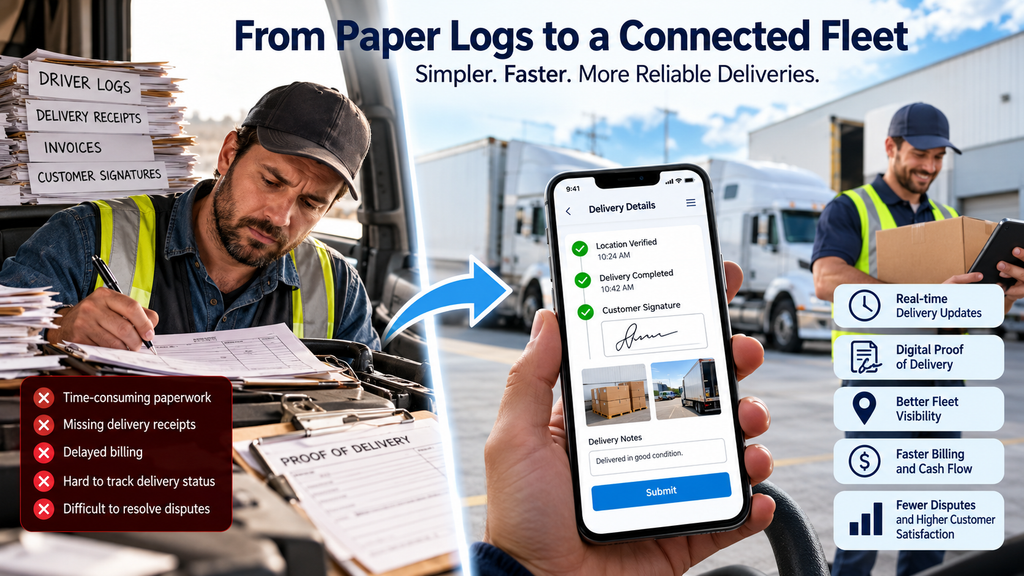
With the right electronic proof of delivery software, fleet operators can reduce manual paperwork, improve delivery visibility, and make shipment records easier to retrieve. A well-designed mobile proof of delivery app can also support offline data capture, exception reporting, and automated status updates.
This guide explains how to replace paper-based delivery workflows, which features to prioritize, how to connect a mobile app with existing fleet systems, and how to measure the business value of digital driver logs and proof of delivery.
How Can Fleet Operators Replace Manual Driver Logs and Paper Proof of Delivery?
Fleet operators can replace paper records with a mobile application that captures driver logs, delivery timestamps, customer signatures, photos, and shipment status updates. The app can connect with fleet management, transportation, warehouse, and billing systems to reduce duplicate data entry. Offline functionality allows drivers to record information when connectivity is limited and synchronize it later. A phased rollout helps businesses validate the workflow before deploying it across the fleet.
Why Manual Driver Logs and Paper Delivery Receipts Create Problems
Paper-based delivery workflows may seem inexpensive because they do not require a new software platform. However, their full cost includes the time needed to create, collect, check, correct, store, and retrieve records.
As a fleet grows, these tasks become harder to manage consistently.
1. Drivers Spend Too Much Time on Paperwork
Drivers need to focus on safe driving, timely deliveries, vehicle inspections, and customer handoffs. Yet manual processes can require them to complete forms, write delivery notes, collect signatures, record odometer readings, and return documents to the office.
The paperwork may be completed at different times, creating gaps between the actual delivery and the moment the office receives confirmation.
A mobile application can replace repetitive paper forms with guided digital workflows. Drivers can enter information once, choose from predefined options, attach supporting evidence, and submit the record through the app.
The interface should minimize typing and unnecessary steps. All data entry and signature capture must take place when the vehicle is safely stopped and the driver can complete the task without distraction.
2. Dispatchers Cannot See Delivery Progress Clearly
A dispatcher may know that a driver left the warehouse but have no reliable way to confirm whether the shipment arrived, whether the customer was available, or whether the delivery failed.
Staff may need to call drivers repeatedly for updates. If several deliveries are running late, dispatchers can lose valuable time gathering basic information instead of resolving exceptions.
A connected fleet management mobile app can send status updates when drivers complete milestones such as:
- Arrived at the delivery location
- Delivery started
- Delivery completed
- Customer unavailable
- Partial delivery recorded
- Delivery exception reported
- Return or redelivery required
These updates give dispatchers a clearer view of delivery activity across the fleet. Where useful and permitted, GPS information can help verify location and support estimated arrival times.
3. Missing Delivery Receipts Can Delay Billing
For many transportation companies, proof of delivery is an important part of the billing process. Customers may require a signed receipt, delivery reference, purchase order number, or evidence that a shipment arrived in acceptable condition.
When paperwork arrives late, is incomplete, or cannot be matched to the correct shipment, invoicing may be delayed.
An electronic proof-of-delivery workflow can associate the delivery record with the shipment, customer, order, and driver. Once the required information is validated, the application can make the record available to the billing team or trigger a downstream workflow.
Automation should not automatically approve every invoice. The business can define rules for missing signatures, partial deliveries, damaged goods, and other cases that require review.
4. Delivery Disputes Are Difficult to Investigate
A customer may report that a shipment was never delivered, arrived damaged, or contained fewer items than expected. A paper receipt may show a signature but provide little additional context.
The operations team may need to search through paper files, email attachments, phone records, and driver messages to reconstruct the event.
A digital proof-of-delivery record can combine several useful pieces of evidence:
- Shipment and order identifiers
- Delivery date and time
- Driver and vehicle details
- Customer signature, where appropriate
- Delivery photographs
- Delivered and undelivered quantities
- Exception codes and driver notes
- Relevant location information, subject to company policy
These records do not automatically eliminate disputes, but they can provide a more consistent evidence trail and make investigations easier.
5. Employees Enter the Same Information More Than Once
A common problem occurs when a driver completes a paper form and an office employee later enters the same information into a transportation management system (TMS), enterprise resource planning (ERP) platform, spreadsheet, or billing application.
Repeated data entry creates opportunities for incorrect shipment numbers, wrong delivery dates, inconsistent quantities, and duplicate records.
A connected mobile application can capture information at the source and transmit it to the systems that need it. Validation rules can check required fields, while integration logic can prevent duplicate submissions and flag conflicting data.
This creates a more consistent flow of information from delivery execution to reporting and billing.
Why Fleet Digitization Matters: Three Research Findings
Digital fleet operations involve more than GPS tracking. Businesses also need reliable information about delivery completion, shipment exceptions, driver activity, and supporting documents.
The following research provides useful context for fleet technology investment.
1. Delivery Visibility Is an Important Operational Concern
The 2026 State of Fleet Operations research surveyed 116 fleet and operations technology professionals. It reported that 58% considered delayed, missing, or incomplete shipments a significant problem, while 72% said mobile apps supporting delivery confirmation would be valuable to their companies.
For fleet operators, this highlights the importance of capturing delivery events and making accurate information available to the teams that need it.
These survey findings describe the respondents’ experiences and views; they should not be interpreted as guaranteed results from adopting a particular application.
2. GPS Fleet Tracking Is Already Widely Used
According to the 2025 Verizon Connect Fleet Technology Trends Report, based on responses from 543 fleet management professionals, 69% of US respondents reported using GPS fleet tracking. The report also found that 47% achieved positive return on investment from GPS fleet tracking in less than a year.
GPS tracking and electronic proof of delivery solve different problems. GPS helps businesses understand vehicle location, while ePOD captures evidence of delivery. Connecting the two can provide a more complete operational picture, where the technology and business requirements support it.
The reported GPS tracking ROI should not be treated as a forecast for a custom mobile application.
3. Research Shows the Potential Value of Better Delivery Operations
A 2025 study published in Transportation Research Part C evaluated a mobile fleet inventory approach for an on-demand delivery platform in Amsterdam. Its case study reported a 17% reduction in total system costs and a 35% reduction in rider idle time compared with stationary facility operations.
This study evaluated a specific delivery model. It does not prove that every trucking fleet will achieve the same results by implementing an ePOD app.
The broader lesson is that fleet technology should be evaluated against measurable operational outcomes. Businesses should establish their own baseline and track results after deployment.
What Is Electronic Proof of Delivery Software?
Electronic proof of delivery software records digital evidence that a shipment or delivery was completed. Depending on the business requirements, it may capture a signature, photograph, timestamp, item quantities, delivery notes, and exception details.
A connected solution combines these functions with driver logs, dispatch, shipment management, customer communication, and back-office workflows.
For example, a distributor may assign a delivery to a driver through its TMS. The driver sees the assigned stop in the mobile app, confirms arrival, records delivered quantities, captures the customer’s signature, and submits the proof-of-delivery record.
The system then updates the shipment status and makes the evidence available to customer service and billing.
The exact workflow depends on the fleet’s operations, existing software, customer requirements, and applicable regulations.
Essential Features of a Mobile Proof of Delivery App
The best application is not necessarily the one with the largest feature list. It is the one that supports the tasks drivers and office teams perform every day without creating unnecessary work.
1. Digital Driver Log Software
Digital driver log software replaces paper records with structured mobile forms for the activities a business needs to record.
Depending on the operation, the application may capture:
- Driver and vehicle identification
- Shift start and end records
- Trip or route references
- Odometer readings
- Pre-trip and post-trip inspection checklists
- Fuel or expense records
- Delivery-related notes
- Operational exceptions
The app should use required fields, sensible defaults, and validation rules to reduce incomplete records.
Important compliance distinction: A custom driver log app is not automatically a legally compliant electronic logging device (ELD). US motor carriers subject to federal hours-of-service electronic logging requirements must use an appropriate compliant ELD. The Federal Motor Carrier Safety Administration explains these requirements in its ELD guidance.
A connected mobile application may integrate with a compliant ELD, but it should not replace one unless it meets all applicable requirements.
2. Electronic Proof of Delivery
Electronic proof of delivery is one of the most important features for fleets that need to verify completed shipments.
A configurable ePOD workflow may include:
- Delivery confirmation
- Customer or authorized recipient signature
- Delivery photographs
- Order or purchase order reference
- Delivered quantity
- Shortage, damage, or refusal details
- Delivery timestamp
- Driver notes
- Customer acknowledgment
The application should make it clear when a record is complete and when additional information is required.
For example, if a customer accepts only part of a shipment, the driver should be able to record the quantity delivered and the quantity refused. The system can then flag the delivery for inventory reconciliation, customer service, or billing review.
3. Photo and Document Capture
Photos can help document the condition of goods, packaging, delivery locations, or items left at an approved drop-off point.
A useful implementation should connect every photo to the correct shipment and delivery event. Files should have appropriate access controls and retention rules rather than being scattered across personal devices and messaging apps.
The business should define when photos are required, who can view them, how long they are retained, and how sensitive customer information is protected.
4. Real-Time Delivery Status Updates
A connected application should update shipment milestones quickly enough to support dispatch and customer service.
The system may send an update when the driver marks a stop as completed or records an exception. Where network access is unavailable, the app should save the event locally and synchronize it later, while clearly showing that the record has not yet reached the server.
Managers should be able to distinguish between a confirmed server update and a status that remains pending synchronization.
5. Offline Data Capture and Synchronization
Drivers often work in warehouses, rural areas, loading docks, industrial sites, or locations with weak cellular coverage.
An application that requires a constant internet connection may prevent drivers from completing critical tasks when coverage drops.
Offline support should allow the driver to access assigned work and record permitted events without connectivity. Once the device reconnects, the app can synchronize the data.
A reliable offline design should address:
- Local encrypted storage where appropriate
- Clear synchronization status
- Retry logic for temporary failures
- Duplicate prevention
- Conflict handling when records change in multiple systems
- Secure removal of locally stored data when no longer needed
Offline support must be tested under realistic conditions. It should not simply be assumed to work because the app can open without an internet connection.
6. Delivery Exception Reporting
A delivery does not always go according to plan. Customers may be unavailable, a site may be closed, a shipment may be damaged, or the driver may be unable to access the delivery area.
Without structured exception reporting, dispatchers may receive incomplete descriptions or learn about a problem only after a customer complains.
The application should let drivers select a relevant exception, add notes, attach evidence, and submit the event. The system can then route the issue to the appropriate team based on its type and urgency.
For example, a damaged shipment may require a quality or claims review, while a customer-unavailable event may require dispatch to arrange a new delivery attempt.
7. Route and Stop Information
Drivers should have access to the information needed to complete their assigned work, including stop addresses, delivery instructions, shipment references, and approved customer notes.
Integration with route planning or fleet tracking systems can reduce the need to switch between multiple tools.
If the app uses GPS, the business should define when location is collected, how it is used, who can access it, and how long it is retained. Location tracking should follow applicable privacy requirements and company policy.
8. Customer Notifications
Customers often contact dispatch when they do not know whether a shipment has arrived or when a delivery will occur.
A connected workflow can send status notifications at meaningful milestones, such as dispatch, arrival, completion, or an exception that affects the delivery.
Notifications should be based on validated events rather than unconfirmed information. Customers should not receive a delivery-completed message while the proof-of-delivery record is still incomplete.
Where appropriate, a customer portal can also let authorized users view delivery history and retrieve documents without calling the operations team.
9. Manager Dashboard and Reporting
Fleet managers need a clear view of delivery execution, not simply a list of individual records.
A dashboard may show:
- Assigned, in-progress, completed, and failed deliveries
- Missing or incomplete proof-of-delivery records
- Delivery exceptions by type
- Average time from delivery completion to record availability
- Outstanding records requiring office review
- Repeated delivery issues
- Driver and route performance indicators
Reports should define how each metric is calculated and use consistent data across the app and back-office systems.
10. Security, Permissions, and Audit Trails
Drivers, dispatchers, operations managers, billing staff, and administrators do not all need the same permissions.
Role-based access controls can restrict which records users view or change. Audit trails can record important actions, including status changes, record corrections, approvals, and access to sensitive information where required.
The system should also support secure authentication, data encryption, backup and recovery, and a clear process for removing access when an employee leaves.
These controls are particularly important when delivery records contain customer information, signatures, location data, or commercially sensitive shipment details.
How to Connect a Fleet Management Mobile App With Existing Systems
A mobile application delivers more value when it works with the systems the company already uses. Replacing paper but creating another disconnected data silo can simply move the problem from one place to another.
Transportation Management System Integration
The TMS may provide shipment assignments, route information, stop details, and delivery status. The mobile application can send completed delivery events and exception records back to the TMS.
This allows dispatchers to work from a more consistent view of delivery execution.
ERP Integration
An ERP may contain customer orders, product information, inventory records, and financial transactions. Integration can connect delivery confirmation with order fulfillment and reconciliation.
For example, when a delivery is completed, the application can send the relevant shipment reference and delivery details to the ERP. The ERP can then apply its own business rules before updating order or billing status.
Warehouse Management System Integration
A warehouse management system (WMS) may need confirmation that goods have left the facility or that returned items have arrived.
Clear event definitions help prevent conflicts between warehouse and delivery records. The integration should establish which system owns each field and how exceptions are handled.
CRM Integration
A customer relationship management (CRM) system can use delivery milestones to inform account managers and customer service teams. For example, a delivery exception may create a follow-up task for the assigned account owner.
This helps customer-facing teams respond with more accurate information.
Billing and Accounting Integration
A billing workflow may use validated delivery records to support invoice preparation. Rules should identify missing documents, partial deliveries, disputed quantities, or other cases that require human review.
Automation should move complete records forward while keeping exceptions visible to the right employees.
GPS, Telematics, and ELD Integration
Existing telematics and ELD systems may already collect vehicle location, diagnostics, or regulated driving information. The mobile application should integrate with these platforms where appropriate instead of unnecessarily duplicating regulated functions.
For an example of connected software supporting logistics operations, see HT Business Group’s custom truck booking app development for logistics companies.
Integration Design Considerations
Before development begins, document which system owns each type of data. For example, the TMS may own shipment assignments, while the mobile app records delivery events and the ERP owns invoice status.
The integration design should also specify:
- Which events trigger updates
- How records are matched across systems
- How authentication and API permissions work
- What happens when an integration fails
- How duplicate events are prevented
- How conflicting records are reviewed
- How failed messages are retried
- How integrations are monitored and supported
How to Implement a Connected Driver Application
A fleet application should be introduced in manageable stages. Trying to replace every paper form, reporting process, and legacy integration at once can create unnecessary risk.
Step 1: Map the Current Delivery Workflow
Document how a delivery moves from order assignment to final billing.
Identify who creates the paperwork, which fields are recorded, when signatures are collected, how documents reach the office, and which systems receive the information.
Ask drivers, dispatchers, billing staff, and customer service teams where errors or delays occur most often. Their feedback can reveal problems that may not be obvious from management reports.
Step 2: Prioritize High-Value Workflows
Choose the workflows that create the greatest operational burden.
For one fleet, the priority may be missing delivery receipts. For another, it may be delayed status updates or time-consuming exception handling.
Start with a manageable scope, such as digital delivery confirmation, photo capture, and shipment status updates. Add more advanced functions after the core workflow works reliably.
Step 3: Define the Data Model
Determine which information must be captured for every trip, stop, and delivery.
A typical data model may include a shipment ID, route ID, stop ID, driver ID, customer reference, timestamps, quantities, status, evidence files, and exception codes.
Each delivery record should be traceable to the correct shipment and customer. This reduces the risk of a photo or signature being attached to the wrong order.
Step 4: Design the Driver Experience
Drivers need an interface that is easy to use in real working conditions.
Keep the number of required actions low, make buttons easy to identify, and use clear labels. Where possible, prefill known shipment details and allow drivers to select from structured exception options.
Test the app on the actual devices drivers will use. Consider screen visibility, battery use, connectivity, and the amount of time required to complete each task.
The app should never encourage drivers to interact with it while driving.
Step 5: Build and Test Integrations
Develop the connections to the TMS, ERP, WMS, or other required systems.
Test normal deliveries, partial deliveries, failed deliveries, canceled stops, duplicate submissions, offline synchronization, and integration outages. Confirm that each system receives the right information and that failed updates are visible to support staff.
Step 6: Run a Pilot
Start with a small group of drivers, routes, or locations that represents typical operating conditions.
Compare the new workflow with the existing process. Measure completion times, missing records, data-entry errors, synchronization failures, and driver feedback.
Use the pilot to fix workflow issues before expanding the rollout.
Step 7: Train Drivers and Office Teams
Explain not only how to use the app but also why the process is changing.
Drivers should know how to complete delivery records, report exceptions, work offline, and resolve synchronization problems. Office teams should understand how to retrieve records, review exceptions, correct permitted errors, and monitor incomplete submissions.
Provide a clear support process so drivers are not left guessing when the app fails.
Step 8: Roll Out in Phases
Expand to additional routes or locations after the pilot meets agreed acceptance criteria.
Monitor performance during the rollout, maintain an escalation process, and keep a controlled fallback procedure for critical operations while the new system stabilizes.
Step 9: Improve the Workflow Over Time
After the application is in use, review operational data and user feedback regularly.
Remove unnecessary steps, improve exception routing, refine notifications, and address recurring integration failures. The objective is to make the workflow more reliable over time—not simply to launch a mobile app and leave it unchanged.
How Much Does Custom Logistics App Development Cost?
The cost of custom logistics app development depends on its features, integrations, security requirements, device support, and operational complexity. A basic digital form app is very different from a fleet-wide platform integrated with multiple enterprise systems.
Important cost factors include:
Core mobile features: Digital forms, signatures, photos, delivery status, and exception reporting.
Offline capability: Local data storage, synchronization, conflict handling, and recovery when connectivity returns.
System integrations: TMS, ERP, WMS, CRM, accounting, GPS, telematics, or ELD platforms.
Web dashboard: Dispatcher views, manager reporting, document search, user management, and exception queues.
Security and compliance: Authentication, permissions, audit trails, data retention, privacy requirements, and applicable industry regulations.
Scale and device management: Number of drivers, routes, locations, supported devices, and expected transaction volume.
Ongoing support: Hosting, monitoring, updates, third-party API changes, security maintenance, and user support.
The best way to estimate cost is to define the initial workflow, identify required integrations, and agree on measurable acceptance criteria. A phased implementation can help the business validate value before investing in advanced features.
How to Measure the Business Value of Delivery Tracking and Management Software
Do not judge the project only by whether drivers stop using paper. Measure whether the new process improves delivery operations.
Before deployment, record baseline performance over a representative period. Then compare the same measures after rollout, accounting for changes in volume, route mix, seasonality, and other factors.
Time to Complete Delivery Records
Measure the time drivers spend recording delivery details and the time office staff spend reviewing or re-entering the information.
Proof-of-Delivery Completion Rate
Calculate the percentage of completed deliveries with all required evidence available and correctly linked to the shipment.
Time From Delivery to Record Availability
Measure how long it takes for a completed delivery record to become available to dispatch, customer service, and billing.
Missing or Incorrect Records
Track missing signatures, unmatched shipment references, incomplete fields, duplicate submissions, and other record-quality issues.
Invoice Processing Time
Measure the time between delivery completion and the point when the required delivery documentation is ready for billing.
Delivery Exception Resolution
Track how long it takes to assign, investigate, and close common delivery exceptions.
Administrative Cost
Estimate the staff time spent handling paper records, correcting errors, retrieving documents, and following up on missing information.
A simple business case can compare the cost of the existing process with the cost of the new solution, including development, integration, devices, training, support, and maintenance.
Avoid assuming that every saved minute becomes a cash saving. Time savings may instead create additional capacity, faster customer response, or improved service reliability. Measure the outcome that matters to the business.
Common Mistakes to Avoid When Digitizing Fleet Operations
Digitizing a Poor Workflow Without Improving It
A mobile form that reproduces every unnecessary paper field may add work rather than reduce it. Review the process first and remove steps that do not support an operational or compliance requirement.
Ignoring Offline Scenarios
If drivers cannot submit records in low-connectivity areas, they may return to paper or create workarounds. Offline behavior must be part of the initial design and testing plan.
Building an App That Cannot Integrate
A separate app that does not exchange data with core business systems can create another manual reconciliation process. Define integration requirements early.
Treating Every Delivery as Successful
The application must support partial deliveries, refusals, damage, customer unavailability, and other exceptions. A simple completed/not-completed status is rarely sufficient for complex operations.
Overlooking Security and Privacy
Signatures, photographs, customer information, and location data require appropriate controls. Define access, retention, deletion, and monitoring policies before deployment.
Replacing Regulated Tools Without Checking Requirements
Driver logs, electronic logging devices, and hours-of-service records may be subject to specific requirements. Confirm the applicable rules and use compliant systems where required.
Measuring Adoption but Not Outcomes
A high app login rate does not prove that the new workflow is effective. Measure record quality, processing time, exception resolution, and other operational outcomes.
Why Choose HT Business Group for Fleet Application Development?
Fleet operators may need more than a standalone mobile interface. Their solution may require a driver app, an operations dashboard, integration with existing systems, secure document storage, and a clear process for handling delivery exceptions.
HT Business Group can be considered for a custom software project when the required solution needs to fit specific delivery workflows rather than forcing the business to change every process around a generic tool.
A practical project discussion should establish:
- The current driver log and proof-of-delivery process
- The most expensive or frequent operational problems
- The systems that must exchange information
- The mobile devices and connectivity conditions involved
- The evidence and audit requirements
- The security, privacy, and compliance constraints
- The metrics that will define success
The implementation plan should match the fleet’s actual requirements. Some businesses may benefit from configuring an existing platform; others may need custom mobile development or integration work.
For a related example of connected operational software, explore HT Business Group’s medical supply chain tracking platform case study.
Conclusion
Manual driver logs and paper proof-of-delivery forms create avoidable work when fleet operators need to capture, transfer, verify, and retrieve delivery information across multiple teams.
A connected mobile application can bring digital driver logs, electronic proof of delivery, photos, signatures, timestamps, exception reporting, and system integrations into one workflow. With offline support, appropriate security, clear data ownership, and a phased rollout, fleet operators can improve delivery visibility and reduce unnecessary administrative work.
The strongest starting point is not to build every possible feature. It is to identify the delivery workflow causing the most friction, measure its current performance, and introduce a focused solution that drivers and office teams can use reliably.
Ready to modernize your delivery workflow? Contact HT Business Group to discuss your driver log, proof-of-delivery, and fleet application requirements.
Frequently Asked Questions
1. How can fleet operators replace manual driver logs and proof-of-delivery paperwork?
Fleet operators can replace paper records with a connected mobile application that captures driver logs, delivery timestamps, customer signatures, photos, and shipment status updates. The app can share this information with dispatch, billing, and fleet management systems. Offline functionality helps drivers record information in areas with limited connectivity. This creates a more consistent digital workflow with fewer manual handoffs.
2. What is an electronic proof-of-delivery application?
An electronic proof-of-delivery application records digital evidence that a shipment has reached its intended destination. Depending on the workflow, it can capture customer signatures, delivery photos, timestamps, delivered quantities, and exception notes. These records can be linked to the relevant shipment and made available to authorized teams. This helps businesses retrieve delivery evidence and investigate disputes more efficiently.
3. What features should a driver log and proof-of-delivery app include?
A driver log and proof-of-delivery app should include digital forms, shipment details, signature capture, photo uploads, timestamps, delivery status updates, and exception reporting. Offline data capture and reliable synchronization are important for drivers working in areas with poor connectivity. Integration with transportation, warehouse, and billing systems helps prevent duplicate data entry. Security controls and audit trails help protect operational records.
4. Can a mobile proof-of-delivery app work without an internet connection?
Yes, if the application is designed to support offline operations. Drivers can record permitted delivery information locally and synchronize it when the device reconnects to the internet. The app should show which records are saved locally and which have reached the central system. Secure local storage, duplicate prevention, and conflict handling are important for reliable offline performance.
5. How does a connected mobile app reduce delivery paperwork and administrative work?
A connected mobile app captures delivery information once and shares it with authorized business systems. This reduces the need to collect paper receipts, re-enter shipment details, and search through disconnected files. Automated validation can identify missing signatures, incomplete records, and delivery exceptions before they move to the next workflow. Businesses should measure the actual time saved and error reduction after deployment.
6. Can a proof-of-delivery app integrate with an existing TMS or ERP system?
Yes, a custom mobile application can integrate with an existing transportation management system (TMS), enterprise resource planning (ERP) platform, warehouse management system, or billing application. The integration can synchronize shipment assignments, delivery events, order references, and supporting documents. The design should define data ownership, synchronization rules, authentication, and error handling. Integration feasibility depends on the existing systems and the interfaces they support.
7. Is a custom driver log app the same as an electronic logging device (ELD)?
No. A custom driver log application records operational information defined by a business, while an electronic logging device is subject to specific regulatory requirements when used for applicable US hours-of-service records. A general-purpose mobile app should not be assumed to meet ELD requirements. Fleet operators should check applicable Federal Motor Carrier Safety Administration rules and use a compliant ELD solution when required.
8. How much does it cost to build a custom fleet driver application?
The cost depends on the required features, number of users, offline functionality, integrations, security controls, and reporting needs. A basic digital delivery form has a different scope from an application connected to TMS, ERP, telematics, and billing systems. Ongoing costs may include hosting, support, device management, and maintenance. A reliable estimate starts with workflow discovery, technical requirements, and a clearly defined first release.
9. How long does it take to develop a fleet mobile application?
The timeline depends on the application’s complexity, integrations, device requirements, security needs, and testing scope. A focused first release with a limited number of workflows is generally simpler to deliver than a fleet-wide platform with multiple enterprise integrations. Offline synchronization and compliance requirements can add significant work. A phased plan with a pilot helps validate the solution before a wider rollout.
10. How can fleet operators measure the ROI of a proof-of-delivery application?
Fleet operators can measure ROI by comparing the cost and performance of the old process with the new one. Useful metrics include administrative time per delivery, missing proof-of-delivery records, invoice preparation time, data-entry errors, and delivery exception resolution time. The calculation should include software development, integration, devices, training, and ongoing support. Results should be based on the fleet’s actual operating data rather than assumed savings.