Quick Answer: How Do You Optimize Shopify Product Content for Google AI Overviews?
To optimize Shopify product content for Google AI Overviews, write clear product descriptions that answer real shopper questions, add accurate structured data, keep your Google Merchant Center feed clean, show real reviews, and make your pages fast and easy to crawl. Google wants helpful, trustworthy, people-first content. The more clearly your page answers a question, the more likely Google is to use it.
That is the short version. The rest of this guide shows you how to do each step on a Shopify store, in simple words, with examples you can copy.
What Are Google AI Overviews, and Why Should Shopify Store Owners Care?
Google AI Overviews are short AI-made summaries that show at the top of some search results. They give a quick answer to a question and link to web pages where people can learn more. Google explains how these features work on its page about AI features and your website.
Think about how people shop today. They do not only type “running shoes.” They ask things like:
- “What are the best running shoes for flat feet?”
- “Is a cotton or linen shirt better for hot weather?”
- “How do I pick a coffee grinder for French press?”
These are the exact searches where AI Overviews often show up. If your product content answers these questions well, your store has a real chance to be linked inside that summary. If your pages have thin, copied, or vague text, Google has little reason to pick you.
Here is why this matters for your Shopify store:
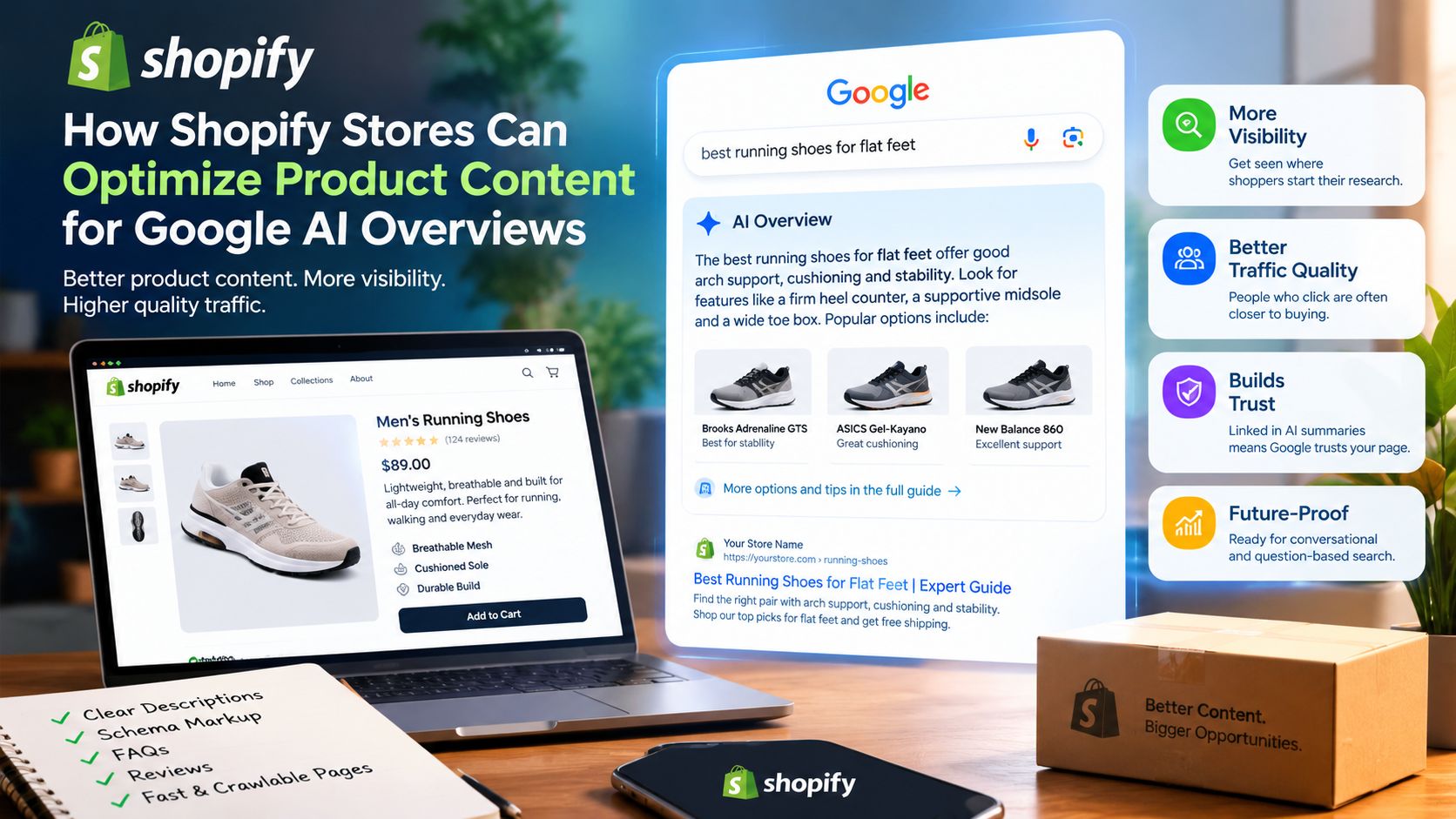
- More visibility. Your product or collection page can appear where shoppers start their research.
- Better traffic quality. People who click from a helpful answer are often closer to buying.
- Trust. Being linked in an AI summary tells shoppers that Google sees your page as a useful source.
- Future-proofing. Search is moving toward question-based, conversational results. Content that is clear and complete will keep working as that shift continues.
One honest note: no one can promise a spot in AI Overviews. Google says there are no special tricks or extra files needed. Pages must be indexed and eligible to show in regular search with a snippet. So the goal is not to “hack” AI Overviews. The goal is to build the best product content you can, in a format that is easy for both people and machines to understand.
How Do AI Overviews Choose Which Pages to Show?
Google does not publish an exact formula, but its public guidance points to a few clear ideas. Understanding them helps you write better product content.
Helpful, people-first content
Google asks site owners to create content that is made for people first, not for search engines. Its guide on creating helpful, reliable, people-first content is worth reading start to finish. It asks questions such as: Does your content show real experience? Does it give a complete answer? Would a reader feel they learned enough?
Strong E-E-A-T signals
E-E-A-T stands for Experience, Expertise, Authoritativeness, and Trustworthiness. For a Shopify store, this means:
- Experience: You have actually used, tested, or handled the product.
- Expertise: You know the topic, such as fabrics, ingredients, sizing, or materials.
- Authoritativeness: Others see your brand as a real source in your niche.
- Trustworthiness: Your store is honest about prices, shipping, returns, and contact details.
Clear structure
AI systems pull text in small pieces. Pages with clear headings, short paragraphs, lists, and tables are easier to read and quote. A wall of text is hard to use.
Accurate, consistent data
If your product page says “in stock” but your feed says “out of stock,” that is a trust problem. The same goes for price, size, color, and brand. Consistency across your page, structured data, and feed matters.
Good technical health
If Google cannot crawl or index your page, it cannot use it. Fast pages, clean URLs, and mobile-friendly design all help.
Keep these five ideas in mind as you work through the steps below.
Step 1: Write Product Descriptions That Answer Real Questions
Most Shopify stores paste in the manufacturer’s description. Hundreds of other stores do the same. Google sees the same text across many sites and has no reason to prefer yours.
Start with a one-sentence answer
Open each product description with a simple, direct sentence that says what the product is, who it is for, and its main benefit. This is also great for featured snippets.
Weak example:
“Introducing our amazing new bottle, crafted with love for your lifestyle.”
Strong example:
“The 32 oz insulated steel water bottle keeps drinks cold for up to 24 hours and fits most car cup holders, which makes it a good pick for commuters and gym users.”
The strong version says what it is, gives facts, and names the buyer. Only claim numbers you can prove, like “24 hours,” if you have tested them or the maker has documented them.
Cover the questions shoppers actually ask
Before you write, list the questions a buyer might have. Good places to find them:
- Your customer support inbox and live chat logs
- Product reviews and review questions
- Comments on social media
- The “People also ask” box on Google
- Questions in Reddit threads and forums in your niche
Then answer the top five to ten questions right on the product page. For a pair of hiking boots, for example, you might answer:
- Are they waterproof?
- Do they run true to size?
- How much do they weigh?
- Are they good for wide feet?
- How do I clean them?
Use simple, plain words
Write like you talk to a friend who is about to buy. Skip empty words like “premium,” “world-class,” and “revolutionary” unless you can back them up. Short sentences win. If a sentence is long, split it.
Add real details that others do not have
This is where you beat copied content. Add:
- Your own test results or notes (“We wore these for 30 days on rocky trails.”)
- Real photos taken by your team
- Sizing tips from customer feedback
- Care steps you have tried yourself
- Who the product is not right for (this builds trust)
Match the search intent
Some product pages should focus on buying (“Buy now, free shipping”). Others should help people compare and learn. Most product pages need both. Put the key buying facts up top and deeper guidance below.
Step 2: Structure Your Product Pages for Easy Reading
Even great content loses value if it is hard to scan. Shopper and machine behavior are alike here: both look for clear signals.
Use headings the right way
Each product page should have one H1, which is the product name. Below it, use H2 and H3 headings for sections like “Features,” “Materials,” “Size Guide,” “Shipping,” and “Frequently Asked Questions.” Write headings as clear labels or questions.
Use bullets and tables for facts
Lists and tables are easy to pull into answers. Try a spec table like this:
| Feature | Detail |
| Material | 18/8 stainless steel |
| Capacity | 32 oz (946 ml) |
| Weight | 14 oz |
| Care | Hand wash recommended |
Shopify themes let you add tables in the description editor, or you can use metafields to display structured specs. You can learn more in Shopify’s guide to metafields.
Keep paragraphs short
Aim for two to four lines per paragraph. Use white space. Most shoppers read on phones, so short blocks work better.
Put the answer first
When you answer a question, give the direct answer in the first sentence and explain after. This is called the “answer-first” style, and it helps with both featured snippets and AI Overviews.
Example:
Question: Is this jacket waterproof?
Answer: No, this jacket is water-resistant, not fully waterproof. It handles light rain for about 20 to 30 minutes but is not made for heavy storms.
Step 3: Add Product Structured Data (Schema Markup)
Structured data is code that tells search engines exactly what is on your page: the product name, price, brand, rating, and more. It does not guarantee placement in AI Overviews, but it helps Google understand your product details without guessing. It is also a key part of Shopify SEO.
What to include
The main type is the Product schema. Google explains the fields it supports in its guide to Product structured data and its guide to merchant listing structured data. Important fields include:
- name: The product name
- image: Clear product images
- description: A short, honest description
- brand: The brand name
- sku / gtin / mpn: Product identifiers
- offers: Price, currency, availability, and condition
- aggregateRating and review: Only if you have real reviews on the page
- shippingDetails and hasMerchantReturnPolicy: Shipping and return info
How to add it on Shopify
Many modern Shopify themes already output basic Product schema. But the default setup is often incomplete. Here is a simple plan:
- Check what you have. Paste a product URL into Google’s Rich Results Test and see which fields appear and which have errors or warnings.
- Fix gaps. Missing brand, GTIN, or availability are common problems. Fill in the fields in your Shopify product admin.
- Avoid duplicates. Some review apps and SEO apps add their own schema on top of the theme’s schema. Two conflicting blocks can cause confusing signals. Keep one clean source.
- Keep it honest. Do not mark up reviews that are not on the page. Do not add fake ratings. This can lead to penalties.
- Re-test after every theme or app change.
Add FAQ content carefully
FAQ schema used to show rich results for many sites, but Google has limited that display for most websites. You should still write FAQ sections on your pages because real readers like them and they make great answer blocks. Just do not rely on the markup alone to earn a special look in search.
Step 4: Keep Your Google Merchant Center Feed Clean
If you sell products online, Google Merchant Center is one of the most important tools you can use. It connects your product data to Google surfaces such as Shopping results and free product listings. Product data quality also supports how Google understands your catalog.
Why the feed matters for AI-style results
Google’s shopping experiences lean heavily on product data. Clean, rich data makes it easier for Google to match your product to a shopper’s question. Weak data makes your product harder to match or can get it disapproved.
Connect Shopify to Merchant Center
Shopify offers the Google & YouTube app, which syncs your products to Merchant Center. Once connected, your job is to keep the data strong.
Feed quality checklist
- Titles: Include the brand, product type, and key details such as color, size, or material. Example: “Nimbus Insulated Steel Water Bottle, 32 oz, Matte Black.”
- Descriptions: Write real descriptions, not just keywords.
- Images: Use sharp images on clean backgrounds. Follow the image rules in Merchant Center.
- GTINs: Add barcodes (UPC, EAN) when you have them.
- Price and availability: Make sure they match your product page exactly.
- Product type and category: Use Google’s product category so your item lands in the right group.
- Attributes: Fill in color, size, gender, age group, material, and pattern where they apply.
- Shipping and returns: Set these up fully in Merchant Center.
Check diagnostics often
Merchant Center shows warnings and errors. Fix disapprovals fast. A product that is not approved cannot show. Make it a weekly habit to open the diagnostics page.
Step 5: Build Trust With Reviews and Real-World Proof
Shoppers trust other shoppers. Google also values signs of real experience. Reviews are one of the strongest sources of that proof.
Collect reviews on a steady basis
Ask buyers for reviews a week or two after delivery, when they have had time to use the product. Use a review app that lets customers add photos. Photos make reviews more helpful and more believable.
Show full review content on the page
Make sure review text is visible in the page HTML and not hidden behind a script that does not load. This helps both people and crawlers see it.
Answer review questions
Some review tools let shoppers ask questions. Answer them quickly and in full sentences. These Q&As often match real search questions, and they can turn into great page content.
Add a short “What customers say” summary
Write a brief section that sums up common points from reviews, like “Most buyers say the bottle keeps ice for a full day but the lid takes a moment to learn.” This shows real feedback and adds unique text. Only write what your reviews actually say.
Do not fake anything
Fake reviews harm trust and can break Google’s rules and consumer protection laws. Focus on getting real feedback.
Step 6: Create Helpful Collection Pages and Buying Guides
Many AI Overview questions are broader than one product. People ask “what is the best” or “how to choose.” Your collection pages and blog posts can answer those.
Improve your collection pages
Most Shopify collection pages are just product grids with no text. Add a short intro above the grid and a helpful block below it. Include:
- A clear definition of what the collection covers
- Who the products are for
- How to choose between options
- Links to key buying guides
Write buying guides
A buying guide is a blog post like “How to Choose a Backpack for Travel” or “Linen vs. Cotton Shirts: Which Is Better in Summer?” Use this format:
- A direct answer in the first paragraph
- A simple list of what to look for
- A comparison table
- Your top picks with links to product pages
- A short FAQ section
Link it all together
Use internal links to connect guides, collections, and product pages. Use clear anchor text, such as “insulated steel water bottles,” not “click here.” Good internal linking helps Google find pages and understand how they relate. Shopify’s own help center has solid basics on SEO for your online store.
Show real expertise
Put an author name on your guides, add a short bio, and say why the writer is qualified. If a product category needs expert review (health, safety, or finance-related items), have a qualified person check the content.
Step 7: Write for Featured Snippets and Conversational Searches
Featured snippets and AI Overviews both reward direct answers. If you already write for snippets, you are halfway there.
Use these snippet-friendly formats
Definition format. Start with “X is…” in one or two sentences.
Example: “A ceramic pour-over dripper is a cone-shaped brewer that holds a paper filter and lets hot water drip through ground coffee into a cup.”
List format. Use numbered steps for how-to content and bullets for features or tips.
Table format. Use tables for comparisons, sizes, and specs.
Question-and-answer format. Use a question as the heading and answer it in 40 to 60 words right below.
Think in natural language
People now type or speak full questions. Write headings and text that match how people talk:
- “Does this mattress work for side sleepers?”
- “How long does a leather wallet last?”
- “What size yoga mat should I buy for my height?”
Keep each answer self-contained
An AI system may pull only one section. Make sure each section makes sense on its own, without needing the rest of the page.
Step 8: Use Keywords Naturally, Not by Force
Keywords still matter. They tell search engines what your page is about. But stuffing them in hurts readability and can hurt rankings.
Find the right keywords
Use Google Search Console, Google’s “People also ask” section, autocomplete suggestions, and your own customer language. Look for:
- Primary keyword: The main phrase for the page, such as “insulated steel water bottle.”
- Secondary keywords: Related phrases, such as “stainless steel bottle for gym,” “cold drink bottle 24 hours,” and “leak-proof water bottle.”
- Question keywords: “How long does an insulated bottle keep ice?”
Place them in the right spots
- Page title and H1
- First 100 words of the description
- A few subheadings
- Image file names and alt text
- Meta description
- Internal link anchor text
Read it out loud
If a sentence sounds odd when you say it, rewrite it. Natural language wins. One keyword used clearly in the right places beats ten used awkwardly.
Write strong title tags and meta descriptions
In Shopify, you can edit the page title and meta description in the “Search engine listing” section of each product. A good title tag is clear and specific, such as “32 oz Insulated Steel Water Bottle | Keeps Drinks Cold 24 Hours.” A good meta description gives one reason to click and mentions a key benefit, such as free returns or a warranty.
Step 9: Make Your Shopify Store Fast, Crawlable, and Mobile-Friendly
Great content needs a strong technical base. If Google struggles to load or crawl your pages, your chances drop.
Speed and Core Web Vitals
Google measures real user experience with Core Web Vitals, which look at loading speed, responsiveness, and visual stability. Test your key pages with PageSpeed Insights. Common Shopify fixes include:
- Compress images and use modern formats
- Remove apps you do not use (each app can add scripts)
- Limit heavy sliders, pop-ups, and videos above the fold
- Use a lightweight, well-coded theme
- Lazy-load images below the fold
Make sure Google can index your pages
- Submit your sitemap in Google Search Console. Shopify creates a sitemap for you at /sitemap.xml.
- Check the Pages report for “Crawled, not indexed” or “Excluded” product pages and find out why.
- Do not block important pages with robots rules or noindex tags.
Fix duplicate content
Shopify can create more than one URL for the same product, for example through collection paths. Shopify usually adds canonical tags to point to the main URL, but check that your theme does this properly. Variants such as color or size should not create thin duplicate pages.
Mobile first
Most shoppers browse on phones. Test your product pages on a small screen. Buttons should be easy to tap, text should be readable, and tables should scroll cleanly.
Keep images useful
Write real alt text that describes the image, like “Matte black 32 oz insulated water bottle next to a laptop on a desk.” Skip keyword stuffing. Good alt text helps accessibility and gives Google more context.
Step 10: Show Clear Store Trust Signals
Google wants to show results from sites that look safe and real. Trust signals on your store help both shoppers and search systems.
Add or improve these pages and details:
- About page: Who you are, where you are based, and why you sell what you sell
- Contact page: A real email, phone number, or address
- Shipping policy: Costs, times, and regions
- Return and refund policy: Clear and easy to find
- Privacy policy and terms of service
- Secure checkout: Shopify gives you HTTPS by default
- Brand proof: Press mentions, awards, certifications, and partnerships, if you have them
Link to these pages from your footer and from product pages where it makes sense. If a shopper cannot find your return policy in five seconds, Google’s systems may also see your store as less trustworthy.
Step 11: Track, Test, and Improve
You cannot improve what you do not measure. Since AI Overviews are newer, the data is still limited, but you can still track strong signals.
What to track
- Impressions and clicks for product, collection, and blog pages in Search Console
- Queries that are phrased as questions
- Click-through rate after you update titles and descriptions
- Merchant Center diagnostics for feed errors
- Conversion rate on pages you have improved
- Brand searches over time, which can rise when more people see your store in results
How to test
- Pick ten products or pages to start with.
- Rewrite the descriptions using the steps in this guide.
- Add or fix structured data and feed fields.
- Wait four to eight weeks and compare results.
- Repeat on the next group of pages.
Search for your own topics
Type your target questions into Google from time to time. See whether an AI Overview appears, which sources it links to, and what those pages do well. Do not copy them. Learn from what they answer and find ways to give a better, more complete, more honest answer.
A Simple Product Page Template You Can Copy
Use this outline for your top products. You can reuse it across your catalog.
1. Product title (H1): Brand + product type + key detail.
2. Opening summary (1 to 2 sentences): What it is, who it is for, and the main benefit.
3. Key features (bullets): Four to six short points with real facts.
4. Specs table: Size, weight, materials, capacity, care, and warranty.
5. Who it is for / who it is not for: Two short lists.
6. How it compares: A small table that compares it with one or two similar products in your store.
7. How to use or care for it: Three to five clear steps.
8. What customers say: A short, honest summary of review themes.
9. Frequently asked questions: Five to eight real questions with short, direct answers.
10. Shipping and returns: A short summary with links to full policies.
11. Related products and guides: Internal links with clear anchor text.
Common Mistakes to Avoid
Copying manufacturer text. It makes your page look like every other page. Rewrite it in your own words and add your own insights.
Keyword stuffing. Repeating a phrase over and over hurts readability.
Fake or hidden reviews. These break trust and can break rules.
Mismatched data. Keep price, stock, and variants consistent across your page, schema, and feed.
Ignoring images. Poor, small, or missing images lower trust and conversion.
Thin collection pages. A grid with no text gives Google little to work with.
Bloated pages. Too many apps and scripts can slow your store and hurt user experience.
Making big claims without proof. Words like “best,” “cure,” or “guaranteed” need real support.
Skipping updates. Stale content is easy to fall behind on. Review top pages every few months.
A 30-Day Action Plan
If you want a simple way to get started, follow this plan.
Week 1: Audit
- List your top 20 products and top five collections by revenue or traffic.
- Run each through the Rich Results Test.
- Open Merchant Center diagnostics and note errors.
- Collect the top customer questions from support and reviews.
Week 2: Fix the data
- Fix missing GTINs, brands, and attributes.
- Clean up duplicate or conflicting schema.
- Match prices and availability across all sources.
- Improve titles and meta descriptions.
Week 3: Rewrite the content
- Rewrite descriptions for your top 10 products using the template above.
- Add FAQs and spec tables.
- Add short intros to your top collection pages.
Week 4: Build and measure
- Publish one or two buying guides that answer big questions in your niche.
- Add internal links from guides to products and back.
- Set up a simple tracking sheet for impressions, clicks, and conversions.
- Plan the next batch of pages to improve.
Frequently Asked Questions
What are Google AI Overviews?
Google AI Overviews are AI-generated summaries that appear at the top of some search results. They give a quick answer to a question and include links to pages where users can learn more.
Can I submit my Shopify store to Google AI Overviews?
No. There is no submission form and no special tag. Google says that pages need to be indexed and eligible to appear in search with a snippet. The best approach is to create helpful, accurate content and keep your site technically healthy.
Does structured data guarantee a spot in AI Overviews?
No. Structured data helps Google understand your product details, but it does not guarantee any specific feature. It is still worth doing because it supports product listings and gives search systems clearer data.
How long should a Shopify product description be?
Length should match what shoppers need. Simple products may need 150 to 300 words. Complex or high-priced products may need 500 words or more, plus tables, FAQs, and guides. Focus on being complete and clear, not on hitting a word count.
Do reviews help with AI Overviews?
Reviews add real-world experience and fresh, unique text to your page, which supports trust. They also help shoppers decide. Make sure your reviews are real and visible on the page.
Should I use AI tools to write product descriptions?
You can use AI to draft or speed up your work, but you must review everything for accuracy, add real details from your own experience, and make sure the content is helpful. Google’s focus is on quality and usefulness, not on how the content was made. Do not publish raw, unchecked text.
How often should I update product content?
Review your top pages every three to six months. Update them when products change, when you get new customer questions, or when you see drops in traffic.
Is Google Merchant Center required?
It is not required to have a Shopify store, but it is very helpful. It gives you control over how your product data appears on Google and helps you spot problems early.
What is the most important thing I can do first?
Start with your best-selling products. Rewrite their descriptions to answer real customer questions, fix structured data and feed errors, and add honest FAQs. These changes are simple and give the most value fast.
Final Thoughts
Google AI Overviews are changing how people find products, but the core idea has not changed: help the shopper. The stores that win are the ones that answer questions clearly, show real experience, keep their data clean, and make their sites easy to use.
You do not need a huge budget or a complex plan. You need clear writing, honest details, accurate data, and steady improvement. Start with your top products this week. Add direct answers, real specs, real reviews, and clean structured data. Then keep improving page by page.
If you want expert help with Shopify SEO, product content, and Google Merchant Center setup, the team at HT Business Group can audit your store and build a plan to get your product pages ready for the new way people search.