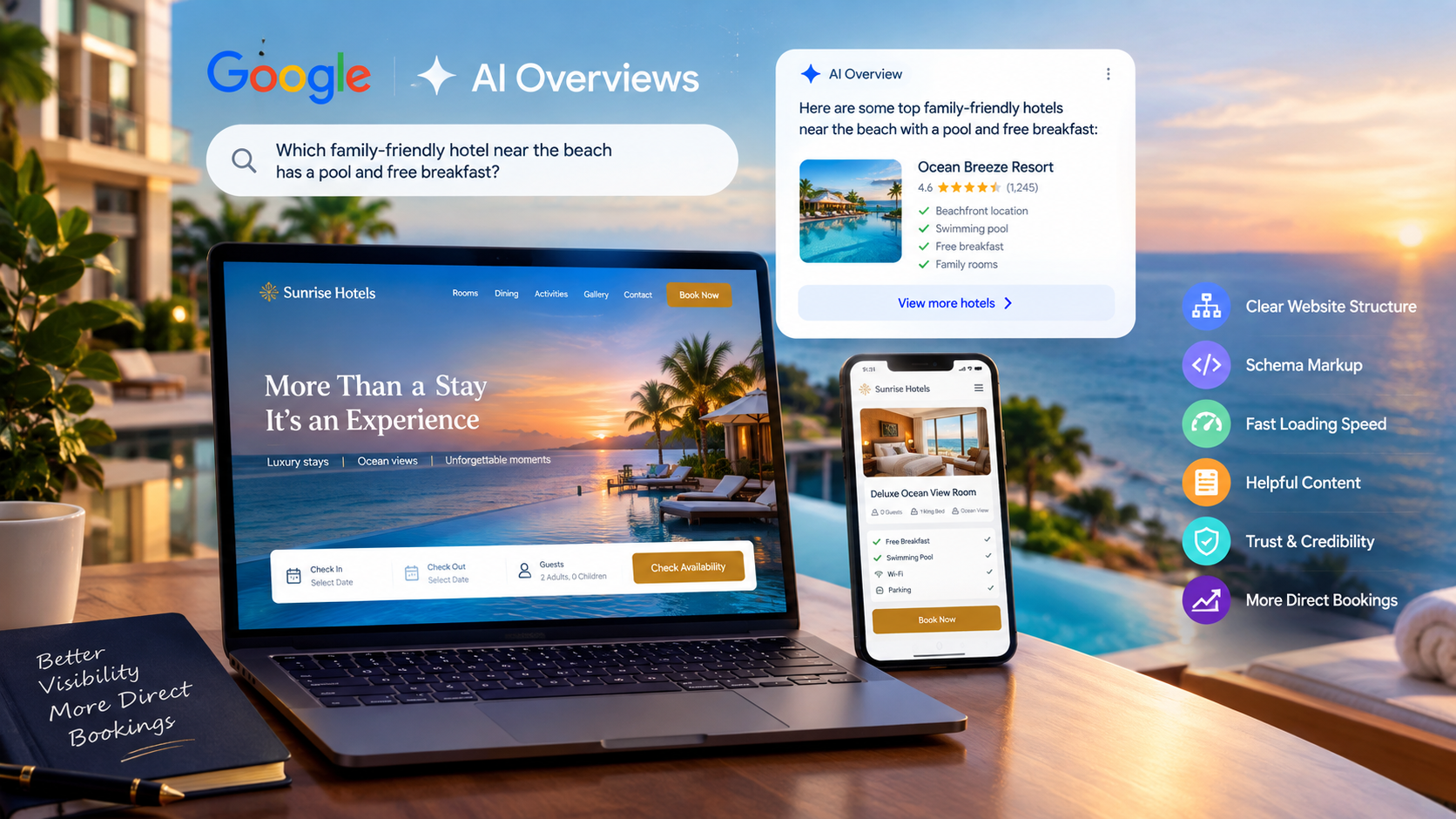
Travelers no longer search the old way. A few years ago, a guest typed “hotels in Goa” and clicked ten blue links. Today, that same guest may ask, “Which family-friendly hotel near the beach has a pool and free breakfast?” and get one clear answer at the top of the page.
That answer often comes from Google AI Overviews. It also comes from other AI search tools that read the web and summarize it for the user.
If your hotel website is not built for this shift, your hotel may not appear in those answers. And if you are not in the answer, you are not in the guest’s mind when they book.
This guide shows you how to build a hotel website that AI systems can read, trust, and quote. I will keep the steps simple and practical. You do not need to be a developer to follow along. You only need to know what to ask your web team to do.
What Are Google AI Overviews, and Why Do They Matter for Hotels?
Google AI Overviews are short, AI-written summaries that appear at the top of some Google search results. They pull information from several web pages and give the user a fast answer, along with links to the sources.
Google explains how these features work and how site owners can appear in them in its guide on AI features and your website. One key point from that guide is that there is no special trick or extra tag. The same basic SEO rules apply. Your pages must be crawlable, indexable, and truly helpful.
Here is why this matters for hotels:
- Travel searches are full of questions. Guests ask about rooms, prices, locations, pets, parking, and food. These are the exact questions AI Overviews love to answer.
- The top spot is smaller than before. An AI box can push regular results down the page. Fewer people scroll.
- Trust decides who gets quoted. AI systems prefer clear, accurate, well-organized sources.
- Direct bookings are at stake. If online travel agencies (OTAs) are the only sources AI can find, they get the credit and the commission.
The good news is that a well-built hotel website can compete. You know your property better than any third-party site does. You just need to share that knowledge in a way machines and humans can both understand.
How AI Search Reads and Chooses Content
Before you build anything, it helps to know how AI search thinks.
AI search tools do three main things:
- They crawl pages. Bots visit your site and read the code and text.
- They understand meaning. They try to figure out what each page is about, who it is for, and whether the facts are reliable.
- They pick short, clear passages to quote. They look for direct answers to specific questions.
This means your website must be easy to crawl, easy to understand, and easy to quote.
Think of your site like a well-run front desk. A good front desk gives a fast, friendly, correct answer. A bad one makes the guest wait, gives vague replies, and sometimes gets the facts wrong. AI treats websites the same way.
Three things AI search looks for in a hotel website:
- Clarity: Each page has one clear topic and gives plain answers.
- Credibility: Facts match across your site, your Google profile, and other platforms.
- Structure: The page uses headings, short paragraphs, lists, tables, and schema markup.
If you get these three right, you are ahead of most hotels.
Step 1: Start With a Strong Technical Foundation
No amount of great writing will help if bots cannot read your site. Fix the base first.
Make Sure Google Can Crawl and Index Your Pages
Your pages must be open to search bots. Check these basics:
- Your robots.txt file should not block key pages. Google has a simple guide to robots.txt if you want to review how it works.
- Your pages should not carry an accidental “noindex” tag.
- You should have a clean XML sitemap that lists your important pages.
- You should submit that sitemap in Google Search Console.
Search Console is free. It tells you which pages are indexed, which have errors, and how people find you. If you only set up one tool, make it this one.
Use Clean, Logical URLs
Keep your URLs short and readable. For example:
- yourhotel.com/rooms/deluxe-sea-view
- yourhotel.com/dining/rooftop-restaurant
- yourhotel.com/things-to-do/old-town-walking-tour
Avoid long strings of numbers, symbols, or session IDs. Clear URLs help both bots and guests understand where they are.
Go Mobile-First
Most travel research happens on phones. Google also uses the mobile version of your site for indexing. You can read more about mobile-first indexing and what it means for your content.
The rule is simple. Whatever a guest sees on desktop should also be on mobile. That includes text, images, and structured data. Do not hide your best content behind tabs that only work on a big screen.
Use HTTPS Everywhere
Your hotel website takes payments and personal details. It must use HTTPS. Browsers warn users away from sites that do not. AI systems also treat secure, stable sites as more trustworthy.
Step 2: Make Your Hotel Website Fast
Speed matters for guests and for search. A slow booking page costs you direct bookings. People leave when a page takes too long.
Google measures real-world page experience with Core Web Vitals. You can learn what each metric means on web.dev’s Core Web Vitals page. The three main ones are:
- Largest Contentful Paint (LCP): How fast the main content loads.
- Interaction to Next Paint (INP): How fast the page reacts when someone taps or clicks.
- Cumulative Layout Shift (CLS): How much the page jumps around while loading.
Test your site with PageSpeed Insights. It gives you a score and a list of fixes.
Easy speed wins for hotel websites:
- Compress your images. Hotels use big photos. Use modern formats like WebP or AVIF and size them correctly.
- Lazy-load images that sit below the first screen.
- Limit heavy sliders and auto-play videos. They look nice but slow everything down.
- Use a good host and a CDN so your site loads fast for guests in different countries.
- Remove unused plugins and scripts. Every extra tool adds weight.
- Load your booking widget smartly so it does not block the rest of the page.
A fast site is not just good for rankings. It also makes guests feel the hotel is well run.
Step 3: Build a Clear Site Structure
AI tools understand your hotel better when your site has a clear map. A simple structure works best.
A strong hotel website usually includes these core pages:
- Home
- Rooms and Suites (one page for each room type)
- Dining (one page for each restaurant or bar)
- Spa, Pool, Gym, and other amenities
- Meetings and Events
- Weddings (if you offer them)
- Offers and Packages
- Gallery
- Location and Getting Here
- Things to Do Nearby
- FAQ
- About Us
- Contact
- Blog or Travel Guide
One Topic Per Page
Do not cram everything into one long page. Give each room type, restaurant, and service its own page. A page about “Deluxe Sea View Room” should talk about that room only. This helps AI match your page to a specific question.
Link Your Pages Together
Use internal links to connect related pages. Your Rooms page can link to your Offers page. Your Location page can link to your Things to Do page. Use clear anchor text such as “our rooftop restaurant” instead of “click here.”
Good internal linking helps bots find all your pages. It also shows which pages matter most.
Use Breadcrumbs
Breadcrumbs show the path to a page, like Home > Rooms > Deluxe Sea View. They help guests and give search engines more context. You can also mark them up with structured data.
Step 4: Add Structured Data (Schema Markup)
This is where many hotel websites fall behind, and where you can win.
Structured data is code that tells search engines exactly what your content means. It labels your hotel name, address, star rating, price range, amenities, reviews, and more in a format machines can read without guessing.
Google gives a clear introduction to structured data. The most common format is JSON-LD, which sits in the page’s code and does not change how the page looks.
Which Schema Types Should a Hotel Use?
- Hotel: The main type for your property. It supports details like star rating, check-in and check-out times, amenities, and pet policy.
- LodgingBusiness / LocalBusiness: Google also documents local business structured data, which covers your address, hours, phone, and geo-location.
- HotelRoom: Use this for each room type, with bed type, occupancy, and room amenities.
- Organization: Your brand name, logo, social profiles, and contact info.
- FAQPage: For your FAQ content. Note that Google now shows FAQ rich results for only a limited set of sites, but the markup still helps machines understand your questions and answers.
- Review and AggregateRating: Only use these when the reviews are real and follow Google’s rules. Do not mark up reviews you copied from other sites.
- Event and Offer: For packages, promotions, and hotel events.
- BreadcrumbList: For your page paths.
Test Your Markup
After you add schema, test it with Google’s Rich Results Test. Fix any errors or warnings. Then watch the enhancement reports in Search Console over the next few weeks.
One Big Rule: Match the Page
Your structured data must match what guests can see on the page. If your schema says you have a pool but your page never mentions it, that is a mismatch. Mismatches hurt trust and can cause Google to ignore your markup.
Step 5: Write Content That AI Wants to Quote
Technical work gets you in the room. Content gets you picked. Here is how to write for both guests and AI search.
Answer the Question First
AI Overviews and featured snippets favor pages that give a short, direct answer right away, then add detail below. Use this pattern:
- Write the question as a heading.
- Give a clear answer in one to three sentences.
- Add more detail, tips, or examples after.
Example:
Does the hotel offer free airport pickup?
Yes. We offer free airport pickup for stays of two nights or more. Please share your flight details at least 24 hours before arrival so our driver can meet you at the terminal.
That short block is easy to quote. It is also useful to a real guest.
Use Simple Words and Short Sentences
Write the way you would speak to a guest at the desk. Avoid long, fancy marketing talk. Words like “unparalleled,” “world-class,” and “unforgettable” say nothing. Facts do the work: “Our rooms have 400-thread-count sheets, blackout curtains, and a quiet air conditioner.”
Be Specific
Vague text gets ignored. Specific text gets quoted. Compare these:
- Weak: “Enjoy a luxurious stay in our beautiful rooms.”
- Strong: “Each Deluxe Sea View Room is 32 square meters and has a king bed, a private balcony, and a rain shower.”
Put real numbers, names, distances, and times in your content. Say how far you are from the airport, the beach, and the main sights.
Use Lists, Tables, and Headings
AI tools love content that is easy to break apart. Use:
- Bullet lists for amenities and features
- Numbered lists for steps, like how to get to the hotel
- Tables for comparing room types, prices, or meal plans
- Clear H2 and H3 headings that match real questions
A simple room comparison table, for example, helps both guests and AI pull out facts quickly.
| Room Type | Size | Bed | Max Guests | View |
| Standard | 24 sq m | Queen | 2 | City |
| Deluxe | 32 sq m | King | 3 | Sea |
| Family Suite | 48 sq m | King + Twin | 5 | Garden |
Keep Facts Fresh
Out-of-date information is a trust killer. Update your check-in times, breakfast hours, pool hours, and policies whenever they change. Add a “last updated” date on pages that change often, such as offers and event pages.
Step 6: Show Real Experience and Expertise (E-E-A-T)
Google looks for signs of E-E-A-T: Experience, Expertise, Authoritativeness, and Trustworthiness. Its guide on creating helpful, reliable, people-first content explains this well.
For a hotel, you have a natural advantage. You live and work in the place guests want to visit. Show it.
Ways to prove experience and trust on your hotel website:
- Show real photos and videos of your actual rooms, staff, and food, not only stock images.
- Add an About page that tells your story, who owns the hotel, and who runs it.
- Name your local experts. A post written by your head chef about local dishes, or by your concierge about hidden spots, carries real weight.
- Share real guest stories and genuine reviews with permission.
- List awards, certifications, and memberships, such as eco-certifications or tourism board approvals.
- Make contact details easy to find. Show your phone number, email, and street address clearly.
- Publish clear policies for cancellation, privacy, and payment.
When AI has to choose between a generic travel blog and a hotel that clearly knows its own town, the hotel with real, first-hand detail can win.
Step 7: Create Helpful Location and Travel Content
Guests do not just search for hotels. They search for the whole trip. If your site only talks about rooms, you miss most of the journey.
Build a Things to Do and Local Guide section. Cover topics like:
- Best time to visit your destination
- Top sights within walking distance
- Local food guides and restaurant tips
- One-day and three-day itineraries
- Getting around: taxis, trains, and airport transfers
- Nearby day trips
- Family, couple, and business traveler guides
- Local festivals and seasonal events
Each guide gives AI more reasons to cite you. It also puts your hotel in front of guests earlier in their planning.
Tip: At the end of each guide, link back to the room or offer that fits the reader. A post about “A Romantic Weekend in the Hills” can link to your couples package.
Step 8: Build a Strong FAQ Section
A good FAQ is one of the best tools for AI search. Guests ask questions in plain language, and your FAQ answers them in plain language.
How to Write Hotel FAQs That Work
- Use real questions your front desk hears every day.
- Write each question as a heading.
- Give a short, direct answer first.
- Keep answers honest and specific.
Common hotel FAQ topics:
- What are your check-in and check-out times?
- Do you allow pets?
- Is breakfast included?
- Is parking free?
- Do you have a shuttle to the airport?
- Is the hotel family-friendly?
- Do you offer early check-in or late check-out?
- What is your cancellation policy?
- Is the hotel accessible for guests with limited mobility?
- Is Wi-Fi free?
You can place a short FAQ on each key page, such as the Rooms page and the Location page, as well as a main FAQ page. This puts answers right where guests need them.
Add FAQPage schema to these sections so machines can read them cleanly.
Step 9: Optimize Your Google Business Profile
Your Google Business Profile often shows up before your website does, especially in local and map results. AI search also uses it as a trusted source of facts about your hotel.
Review and update your Google Business Profile regularly:
- Make sure your name, address, and phone number match your website exactly.
- Choose the right primary category, such as “Hotel” or “Resort.”
- Add all your amenities and attributes.
- Upload fresh, high-quality photos often.
- Keep hours and policies current.
- Add your booking link that points to your direct booking page.
- Use posts to share offers and events.
- Reply to reviews, good and bad, in a polite and helpful way.
Consistency is the key word. If your website says check-in is at 2 PM and your profile says 3 PM, you create doubt. AI systems may skip you or show the wrong detail.
Look Into Google Hotel Center and Free Booking Links
Google also lets hotels connect their rates and availability through Google Hotel Center. This can help your direct rates show up in Google’s hotel results. Ask your booking engine provider whether they support this. It can be a strong way to compete with OTAs for direct bookings.
Step 10: Make Your Booking Engine Easy and Trustworthy
A hotel website has one main job: turn visitors into guests. Even if AI sends traffic your way, a clumsy booking process will waste it.
Booking engine best practices:
- Put a clear Book Now button at the top of every page. Keep it visible on mobile.
- Keep the booking flow short. Fewer steps mean fewer drop-offs.
- Show the total price early, including taxes and fees. Surprises at checkout destroy trust.
- Offer multiple payment options that fit your guests’ region.
- Explain your cancellation policy in plain words right in the flow.
- Add a best rate guarantee message to give guests a reason to book direct.
- List direct-booking perks, such as free breakfast, late check-out, or a welcome drink.
- Make sure the engine works smoothly on all phones and browsers.
Remember that a fast, simple, honest booking path is part of good SEO too. Guests who stay and book send strong signals that your site is useful.
Step 11: Use Images and Video the Smart Way
Travel is a visual choice. Guests want to see the room before they pay for it. AI tools also read images, but only if you help them.
Image best practices for a hotel website:
- Use descriptive file names, like deluxe-sea-view-room-balcony.webp instead of IMG_4821.jpg.
- Write clear alt text that describes what the image shows, such as “King bed and balcony in the Deluxe Sea View Room.”
- Add captions where they help.
- Show every room type, the bathroom, the view, and the common areas.
- Include people and local scenes to add life and context.
- Keep images compressed so your pages stay fast.
Video tips:
- Add a short room tour or property walkthrough.
- Host videos on a platform like YouTube and embed them. This can also help you appear in video results.
- Add captions or a transcript, which help with both accessibility and search.
Good alt text also helps guests who use screen readers. That makes your hotel website more welcoming for everyone.
Step 12: Think About Voice, Conversation, and Natural Questions
People talk to AI differently than they type into search boxes. They ask full questions:
- “Which hotel near the airport has a free shuttle?”
- “Is there a pet-friendly hotel with a pool in this city?”
- “What is a good hotel for a wedding with 150 guests?”
Write content that matches these long, natural questions. Look at your guest emails, chat logs, and phone calls. The words guests use are the words you should use.
A few simple habits help:
- Use question headings that sound like real speech.
- Write conversational answers in simple language.
- Mention who each room or package is best for, such as families, couples, or business travelers.
- Include local terms and landmarks guests actually say.
This makes your content a close match for how people ask AI for help.
Step 13: Manage AI Crawlers and Bot Access
Many AI tools use their own bots to collect web content. You can decide how those bots treat your site. This is a business choice, so think it through.
- Google explains its different crawlers in its overview of Google crawlers. Some controls affect AI training, while regular Googlebot controls Search.
- Other companies publish their own bot details. For example, OpenAI lists its crawlers in its bots documentation.
If you want your hotel to appear in AI answers, do not block the bots that power those answers without a good reason. Blocking them can make you invisible. At the same time, make sure private pages, such as guest accounts and checkout steps, stay protected.
Talk with your web team about the right balance. Review your robots.txt file at least twice a year, since bot names and rules change.
Step 14: Don’t Ignore Bing and Other Search Engines
Google is the biggest, but it is not the only source for AI answers. Other assistants and search tools often lean on Bing’s index. Setting up Bing Webmaster Tools takes only a few minutes. You can submit your sitemap and check for crawl issues there too.
Also keep your listings accurate on other platforms guests trust, such as TripAdvisor and major maps apps. AI systems compare facts across the web. The more your details agree, the more confident they become.
Step 15: Earn Trust Through Mentions and Links
AI search does not only look at your own site. It also notices what others say about you.
Ways to build outside trust:
- Get listed with your local tourism board and chamber of commerce.
- Partner with local businesses, such as tour operators, spas, and restaurants, and ask for links.
- Pitch local news, travel bloggers, and magazines with stories, such as a new chef, an eco project, or a festival package.
- Encourage guests to leave honest reviews on Google and other platforms.
- Join hotel associations and sustainability programs.
- Share your expert content on social media and in newsletters.
Quality beats quantity. A handful of strong, relevant mentions is worth more than hundreds of weak, spammy links.
Step 16: Measure What Matters
You cannot improve what you do not track. Set up a few simple tools and review them often.
- Google Search Console: See which queries bring impressions and clicks, which pages are indexed, and whether your structured data has errors.
- Google Analytics: Track visits, booking-engine clicks, conversions, and where your traffic comes from.
- Google Business Profile Insights: See how guests find you and what actions they take.
- Booking engine reports: Track direct bookings, revenue, and the source of each booking.
Key numbers to watch:
- Organic traffic to key pages
- Impressions and clicks for question-style searches
- Direct booking conversion rate
- Share of bookings that are direct versus OTA
- Page speed and Core Web Vitals scores
- Number and quality of reviews
AI Overview appearances are not always shown as a separate line in reports yet, so look for patterns. If your impressions on question-type searches grow, your content is likely getting picked up.
A Simple Checklist for Your AI-Ready Hotel Website
Use this as a quick review before you launch or relaunch.
Technical
- Site is mobile-friendly and uses HTTPS
- Pages are crawlable and indexed
- XML sitemap is submitted
- Core Web Vitals are in the green
- Clean URLs and clear internal links
Structure and Schema
- Hotel, HotelRoom, Organization, and FAQPage schema added
- Breadcrumbs in place
- Rich Results Test shows no errors
Content
- One page per room, restaurant, and service
- Short, direct answers under question headings
- Tables and lists for easy scanning
- Location and Things to Do guides
- Fresh facts and updated policies
Trust
- Real photos, real staff, real stories
- Clear About, Contact, and Policy pages
- Consistent details across your site, Google Business Profile, and other listings
- Honest reviews and replies
Conversion
- Visible Book Now button
- Short booking flow with clear pricing
- Direct-booking perks and rate guarantee
Common Mistakes to Avoid
Many hotels make the same errors. Avoid these:
- Using only stock photos and generic text. AI and guests both want real, specific details.
- Hiding key info in images or PDFs. Text in images is hard for bots to read. Put rates, menus, and policies in real page text.
- Letting facts drift. Different check-in times on different pages create confusion.
- Overstuffing keywords. Write for people first. Use keywords naturally, once in a while, where they fit.
- Ignoring mobile. A clunky phone experience loses bookings fast.
- Copying content from OTAs or other hotels. Duplicate text adds no value.
- Adding fake or misleading schema. This can harm trust and may lead to penalties.
- Forgetting to update. Old offers, closed restaurants, and past events make a site look neglected.
- Relying only on OTAs. If you give away every booking, you lose guest data and pay high fees.
- Chasing tricks. There is no secret hack for AI Overviews. Helpful, clear, trustworthy content wins over time.
The Future of Hotel Search
AI search will keep growing. Guests will plan whole trips by chatting with an assistant. They might say, “Plan a four-day family trip to Jaipur under a set budget and find a hotel with a pool.” The assistant will then read the web, compare options, and suggest places.
In that world, hotels with clear, structured, honest, and well-linked websites will be easier to recommend. Hotels with thin pages, old facts, and slow sites will fade.
The core idea does not change: be the best, clearest source of truth about your own hotel. Do that, and both people and machines will have a reason to pick you.
Final Thoughts
Building a hotel website for Google AI Overviews and AI search is not about gimmicks. It is about doing the basics very well:
- Build a fast, mobile-friendly, crawlable site.
- Organize your pages clearly, with one topic per page.
- Add structured data so machines understand your hotel.
- Write simple, specific, honest answers to real guest questions.
- Show real experience with true photos, stories, and local knowledge.
- Keep your Google Business Profile and other listings accurate.
- Make booking direct simple, fair, and fast.
- Measure results and improve every month.
Start with one step today. Fix your page speed. Add FAQ answers. Write one local guide. Update your Google Business Profile. Small, steady improvements add up, and over time they turn your hotel website into a trusted source that AI search wants to quote.
If you would like expert help planning or rebuilding your hotel website for AI search, the team at HT Business Group can guide you through each step, from structure and schema to content and direct booking growth.
Frequently Asked Questions
What are Google AI Overviews?
Google AI Overviews are AI-generated summaries that appear at the top of some search results. They combine information from several web pages and link to the sources.
Can a hotel website appear in Google AI Overviews?
Yes. If your pages are crawlable, indexed, helpful, and clear, they can be used as sources. There is no special tag you need to add.
Does schema markup help hotels in AI search?
Yes. Schema markup helps search engines understand your hotel details, rooms, reviews, and FAQs. It does not guarantee a spot in AI Overviews, but it supports clarity and trust.
How long should hotel page content be?
Length depends on the page. A room page may be short and fact-focused, while a destination guide can be longer. Focus on being complete and clear rather than hitting a word count.
How can hotels get more direct bookings from AI search?
Make your site fast, answer guest questions clearly, keep your Google Business Profile accurate, show total prices early, and offer clear perks for booking direct.
Do I need to block AI bots?
That is a business decision. If you want to appear in AI answers, avoid blocking the bots that power them. Always protect private areas like checkout and guest accounts.
How often should I update my hotel website?
Review key facts at least once a month and after every change in rates, policies, or services. Refresh your top pages and guides a few times a year.