Executive Summary
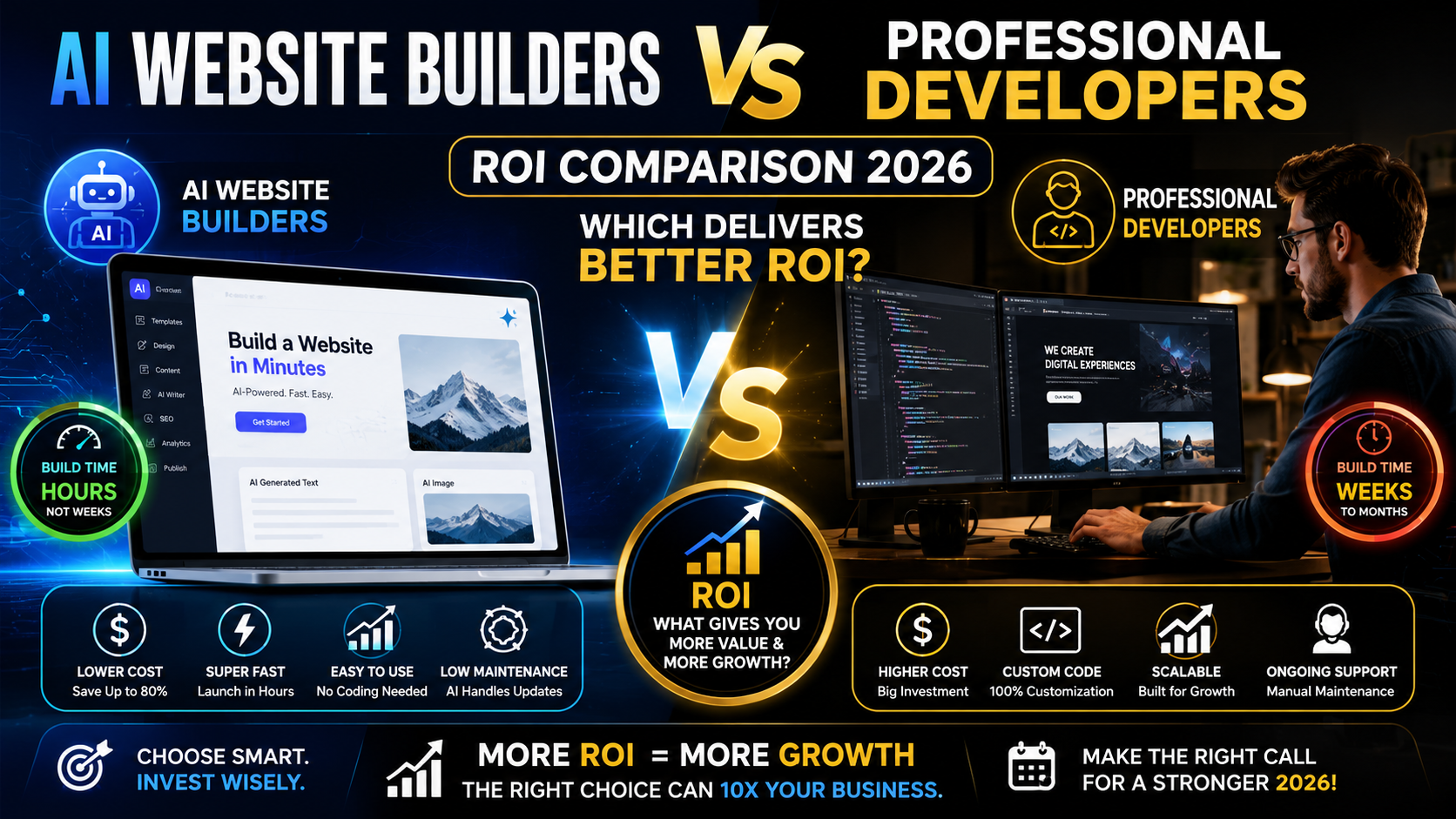
AI website builders deliver fast, low-cost results for simple sites, yielding quick ROI on straightforward use cases. In contrast, professionally developed sites require higher upfront cost and time, but they enable deeper customization, performance, and conversion uplift – often translating to higher lifetime ROI for complex or growth-driven projects. Quantitative data show AI builders can reduce development cost by 90–97% and speed time-to-launch by 10–50×, but professional builds typically deliver 2–4× higher conversion rates and far greater scalability. In practice, small businesses and campaigns often benefit most from AI tooling (low budget, fast launch), while larger or revenue-critical sites usually justify the expense of developers. A hybrid approach (AI scaffolding + developer optimization) is increasingly the “sweet spot,” cutting costs ~40–60% vs full custom while preserving quality. The optimal choice depends on a project’s complexity, budget, and strategic goals.
- Key ROI Drivers: AI builders win on speed and low initial cost, but professional development delivers stronger customization, SEO performance, security, and long-term stability.
- Cost Comparison: Hiring freelance or agency developers typically costs thousands to tens of thousands up front, plus annual maintenance (>$1k). AI builder platforms charge $0–$50/month (often including hosting) and avoid per-change fees. Over 5 years, even an AI subscription (≈$100) is far lower than minimal developer retainer costs.
- Time-to-Market: AI sites launch in hours or days versus weeks/months for custom builds. Faster iteration means earlier leads and revenue.
- UX & Conversion: Professional design and UX yield higher conversion (often 2–4×). AI builders produce “polished” templates, but they may lack conversion-optimized hierarchies and unique branding. Human-driven UX design delivers superior engagement and ROI.
- SEO Performance: AI builders handle basic SEO and speed well, but may struggle with advanced technical SEO and differentiated content. Custom builds can be finely tuned for Core Web Vitals and search intent, boosting traffic and ROI.
- Scalability & Technical Debt: AI platforms can become constrained as needs grow (complex workflows, large sites). Custom development scales with business, avoiding “flat funnel” limitations. AI code often needs cleanup, causing hidden maintenance costs.
- Security: In-house or professional development follows rigorous security standards. AI-generated code may omit checks (sanitization, validation), posing risks like XSS/SQL injection.
- Vendor Lock-In: Some AI builders use proprietary frameworks that hinder migration. With developers, you own the codebase, easing future changes.
- Total Cost of Ownership (TCO): AI tools minimize initial and operational costs (managed hosting, templates). However, rebuilding or migrating later can be expensive. Developer projects have higher up-front cost but often lower long-term TCO if well-managed.
Clear Answer: There is no one-size-fits-all. For simple, low-budget sites, AI builders deliver much faster results and far lower cost—maximizing short-term ROI. For complex, high-growth needs, professional developers typically yield higher long-term ROI through better customization, SEO, security, and conversion optimization. Often the best ROI comes from a hybrid approach: use AI tools to bootstrap the site and hire developers to refine and scale it.
Costs (Build, Hosting, Licensing, Maintenance)
- AI Builder Costs: Most AI platforms charge subscription fees (typically $15–$50/month). Many include hosting, SSL, and AI features out of the box. Example: Playcode’s plan is $21/year (≈$1.75/mo) for unlimited updates. Even premium tools rarely exceed ~$50/month per site. There are no developer wages or unpredictable overruns; revision and content changes are free within the plan. Over 5 years, an AI builder might cost <$100 total, versus thousands for professional support.
- Developer Costs: Freelance web developers typically bill $75–$150/hour in the U.S.. Typical projects: a 5–10 page brochure site might be $3K–$8K+ (US dev), an e-commerce site $8K–$25K+, and a complex web app >$20K. Agencies charge 2–5× freelancer rates, so small business sites often run $10K–$30K. Ongoing maintenance (updates, minor changes) adds $1K–$3K per year. Tables below summarize these ranges:
| Project Type | AI Builder (annual) | Freelance Dev (one-time) | Agency (one-time) |
| Basic info site (5–10 p) | $0–$600 (e.g. $50/mo) | $3K–$8K | $10K–$30K |
| Small e-commerce | $0–$600 | $8K–$25K | $20K–$50K |
| Custom web app | Not ideal (see note) | $20K–$100K+ | $50K–$200K+ |
Note: AI builders excel at standard sites (brochure, landing page, simple store) but struggle with complex apps.
- Hidden Costs (AI vs Dev): Developers incur scope creep, communication, review cycles, bug fixes, and dependency risks. AI tools eliminate most of these: revisions are instant at no extra charge. However, AI builds may incur hidden technical debt (cleanup, rebuilding) later.
Time-to-Market
AI builders offer dramatic speedups in launch time. Aggregate data show AI sites often deploy 10×–50× faster than custom builds. In practice:
- AI Tools: A simple site can go live in hours. Playcode’s data shows landing pages in 10–30 minutes, small businesses sites in 30–60 minutes. NxCode reports 1–7 days vs 4–12 weeks.
- Professional Dev: Freelancers take weeks to months. Even basic portfolios need 1–6 weeks. Complex projects often take 2–6 months.
- Iteration Speed: AI changes propagate immediately; a copy edit can be done in seconds. Developers often need days per minor update. Over a site’s life, AI can save hundreds of hours (and thousands in labor) on revisions.
Faster time-to-market means earlier lead capture and revenue. For example, NxCode cites a SaaS startup that created 12 landing page variants in days (AI) vs 2 (agency), improving conversion by 128%.
Simple & Low Budget
High Complexity or UX critical
Outgrown AI
Working well
Project Requirements
Complexity \& Budget?
AI Website Builder
Professional Dev
Iterate & Evaluate
Show code
Conversion and UX Impact
Conversion Rate: Studies consistently show custom designs outperform templates. One analysis found custom websites yield 2–3× higher conversion rates than template-built sites. Good UX design yields massive ROI: every $1 invested in UX can return ~$100, and poor UX can lose $1.42T in e‑commerce revenue annually.
Figure: Generic AI-generated funnel versus conversion-optimized UX. AI templates often lead visitors through a flat “cookie-cutter” flow (top row), causing high drop-off. Expert-driven design creates intent-matched content, trust signals, and clear CTAs (bottom row), dramatically boosting qualified leads.
- AI Builders: They produce visually polished templates and auto-generated copy, which can satisfy basic needs. For straightforward sites, this yields an acceptable user experience. However, AI sites lack intentional conversion funnels: they rarely match messaging to user intent or highlight trust and proof points. As a result, conversion rates may lag. NxCode’s case study shows an AI-created DTC store still beat some benchmarks (8.3% add-to-cart vs 4.5% avg), but that required smart AI content and marketing; many generic sites will do worse.
- Professional Dev: Custom builds allow tailored UX flows and professional copywriting. They can incorporate user research, unique branding, and A/B testing. Codewave notes design credibility (via Forbes) influences conversion: 74% of users judge trust by design alone. Investing in UX (layout, performance, interactions) yields outsized conversion gains. For example, improving site speed or clarity often lifts sales (see below).
SEO Performance
A website’s SEO drives traffic and ROI. Core considerations:
- Technical SEO & Performance: AI builders generally include basic SEO (meta tags, mobile-friendliness) and decent page speed out of box. NxCode data shows an AI-generated site achieving a 92/100 mobile Core Web Vitals score. However, advanced tuning (structured data, page depth, rich media) is harder to customize. Developers can optimize frameworks and backend for performance and crawlability. Faster load times directly boost conversions (e.g. 0.1s faster → +8.4% conversions).
- Content & On-page SEO: AI can auto-generate content and meta descriptions, which helps cover basics. NxCode notes that with human review and unique value, AI content can drive 500%+ traffic growth. But AI copy tends to be generic. Custom content (expert-written, brand-specific) tends to outrank because it better matches user intent. If SEO is mission-critical, professional writers and developers will yield stronger results.
- Scalability of SEO Efforts: AI tools often automate page creation. NxCode achieved 245 new pages in 6 months, something impractical manually. This “programmatic SEO” can be a huge win for scale. However, managing so many pages still requires oversight (avoid duplicate content, ensure quality). Developer-driven CMS solutions (like WordPress) with SEO plugins give full control, at the cost of slower scale.
Overall, AI builders can achieve good-enough SEO out of the gate and enable rapid expansion, but may trail in highly competitive niches. Custom development allows deeper SEO integration and technical excellence, supporting long-term organic growth.
Scalability and Maintenance
As websites grow, limitations emerge:
- AI Builders: Designed for simplicity, AI platforms shine for small-to-medium sites. But their underlying code and data model can be rigid. Codewave warns of “scalability issues”: adding complex workflows, user accounts, or large product catalogs can hit limits. LeadtoConversion notes that AI-generated code often isn’t cleanly editable, leading to lock-in and maintenance trouble. Over time, patching and updates can become a major drain: bugs from hidden code quirks, plugin conflicts, and necessary rewrites accumulate.
- Professional Dev: Custom architectures are built for scale. A solid codebase can handle growing traffic, advanced features, and multi-team workflows. Developers can plan for performance (caching, CDNs), deploy CI/CD pipelines, and ensure code quality. While initial setup is heavier, future updates are predictable and controlled. A well-built site has lower long-term maintenance burdens, whereas a quick AI build may require a full rebuild to scale.
In sum, AI builders incur little initial maintenance effort (everything is managed), but risk huge maintenance costs later if site complexity grows. In contrast, custom builds have higher upfront development effort and ongoing developer maintenance, but tend to remain maintainable and scalable as business needs evolve.
Customization & Flexibility
- AI Builders: Offer limited customization beyond their templates and settings. You can tweak copy/images via drag-and-drop, but deep layout changes or custom features (e.g. nonstandard forms, API integrations) are usually impossible or require clunky workarounds. If you need a truly unique design or complex user flows, AI builders hit a “ceiling.” Crocoblock summarizes: AI gets you ~60% of the way; beyond that, human expertise is needed.
- Developers: Provide unbounded customization. Every aspect (UI, UX, data model, backend logic) can be tailored to requirements. This enables differentiating features (multilingual support, headless CMS, custom e-commerce logic, etc.) and future-proofs the product. The trade-off is cost and time: these features take specialist work.
Key Insight: Flexibility is a spectrum. For fixed-scope projects (e.g., a landing page with set content), AI customization suffices. For growing businesses needing unique branding or features, custom code unlocks long-term value.
Security and Compliance
Security is critical for business sites:
- AI Builders: Tend to abstract security (automatic SSL, etc.), but the code they generate may lack rigorous protections. LeadtoConversion warns AI code “may be missing input sanitization, output escaping, nonce verification, and validation layers”, opening classic web security holes (SQLi, XSS). Moreover, if AI tools introduce imaginary libraries (dependency hallucinations), they can unknowingly embed malicious packages. Compliance (e.g. GDPR, ADA) might also be overlooked, since AI templates focus on look, not legal requirements.
- Professional Dev: Good developers follow security best practices (e.g. OWASP Top 10). They conduct code reviews, penetration testing, and use vetted libraries. They can implement compliance features (accessibility, data encryption, privacy controls). The stronger up-front process adds cost/time but greatly reduces risk.
For sensitive use cases (e-commerce, healthcare forms, logins), the extra investment in secure development is generally justified. AI sites may suffice for brochure purposes, but business-critical sites should involve professional oversight.
Technical Debt and Long-term TCO
- AI Builders: Create technical debt indirectly. Because much of the site is auto-generated, you may not fully understand or control the underlying structure. Future changes can be painful: LeadtoConversion notes that once the AI code is “messy,” dev talent is pulled into cleanup instead of growth. Vendor lock-in is a form of debt: many AI platforms use proprietary code that’s hard to export. Exiting often requires rebuilding. So while short-term cost is low, total cost of ownership (TCO) can rise if you outgrow the tool.
- Developers: A well-documented codebase with clear architecture minimizes debt. Developers manage version control, dependency upgrades, and refactoring as part of maintenance. This controlled approach incurs more initial cost but lowers unexpected future expenses. Over the long run, custom sites typically have lower incremental cost per year than repurposing AI outputs.
NxCode highlights that the “cost question is lifetime value”: custom sites avoid expensive rebuilds as needs grow. In practice, lean teams often do AI for the MVP and plan developer involvement if/when scale demands it.
Quantitative Benchmarks
| Metric | Traditional Dev | AI Builder | Improvement |
| Development Cost | $15K–$50K+ | $0–$500 | ~97% savings |
| Time to Launch | 4–12 weeks (typical) | 1–7 days | 10–50× faster |
| Iteration Speed | 1–2 weeks per change | Minutes to hours | 100×+ faster |
| UX Conversion Impact | Custom-tailored (high) | Template-based (moderate) | Custom wins in complex flows |
| SEO Performance | Optimized baseline | Generally OK (some limits) | Varies by effort |
| Long-Term Cost (5 yrs) | High upfront, lower year-on | Low upfront, potential spike later | Depends on growth path |
| Vendor Lock-In Risk | Low (own code) | Medium-High (proprietary) | Dev preferred |
Sources: industry benchmarks and case data.
Case Studies: Real Client ROI
- A/B Testing and Conversion: A SaaS startup used AI to quickly generate 12 landing page variants (vs only 2 via agency). The winning variant converted at 18.7% vs 8.2% before – a 128% lift. The cost was essentially zero (covered by $50/mo plan), unlike $6K with an agency. This illustrates AI enabling rapid testing with huge ROI on marketing investment.
- E-Commerce Launch: A DTC skincare brand launched an AI-designed Shopify store in 5 days. First-month results: 8.3% add-to-cart rate (vs 4.5% industry avg), $47K revenue, $18 CAC (vs $25 target). The development cost was only ~$500 vs a custom quote of $8K–$15K, saving ~$7.5K+. “Our AI-generated store outperformed the $12K custom theme we had quotes for,” the founder said.
- SEO & Content Scale: A content marketing firm used an AI site and content generator to publish 245 optimized pages in 6 months, growing organic traffic 4,300%. Human editors only reviewed the top 20% of content, making the strategy feasible. The firm notes, “We couldn’t have done this many pages in 6 months traditionally”.
- Small Business Uplift: An SMB marketing agency reports clients moving from static sites to AI-built ones. One retailer saw 35% higher online sales in 3 months (via AI-optimized product pages and personalized offers). A nonprofit doubled email sign-ups with an AI-driven donation site offering targeted appeals. These cases suggest AI tools can significantly boost engagement with minimal spend.
These examples show how ROI depends on use case. AI excels in rapid testing, small-scale launches, and content expansion. Custom development shines when site performance directly ties to revenue (e.g. high-traffic stores or lead generation engines).
Decision Framework & Checklist
To decide between AI builders, DIY templates, or professional dev, consider:
- Business Size & Budget:
- Small budget (< $500): AI builder – professional dev yields little ROI at this scale.
- Moderate budget ($1K–$5K): Evaluate a hybrid – start with AI, then pay dev for targeted fixes.
- Large budget (>$10K): Developer or agency – long-term value through customization, support, and integration.
- Project Complexity:
- Simple site (brochure, blog, portfolio): AI builder is usually sufficient.
- Content-heavy site: Start with AI skeleton, but plan to bring in dev/SEO for optimization.
- E-commerce or custom app: Developer. If >20 products or complex flows, AI templates break; custom ensures cart/checkout reliability.
- Time-to-Market: If speed is critical (e.g. event site, campaign, MVP), AI saves weeks.
- Long-Term Growth Plans: If site is strategic (customer acquisition, sales) or compliance-heavy, invest in custom build for ROI.
- In-House Expertise: Non-technical founders gain independence with AI tools. Larger teams with dev resources may leverage their own talent better.
Checklist: (✓ = advantage, ✗ = disadvantage)
| Factor | AI Builder | Pro Developer |
| Upfront Cost | Low (mostly subscription) | High (project fees) |
| Maintenance Cost | Minimal (auto-managed) | Ongoing dev retainer (≥$1K/yr) |
| Time to Launch | Days/hours | Weeks-months |
| Custom Features | Limited (templates only) | Fully custom (unbounded) |
| Scalability | Limited by platform | Designed for growth |
| Performance (UX/SEO) | Good baseline, needs tuning | Optimized from ground-up |
| Security | Basic (risks if complex) | Robust (manual audit) |
| Vendor Lock-In | Risk (proprietary) | No (self-hosted code) |
Use this framework to align choice with business needs.
Top AI Builders vs Developer Engagement Models
AI Platforms (examples):
- Wix (AI Features): While classic Wix ADI was retired, Wix now offers AI-assisted design suggestions. Plans start ~$16/mo (includes hosting). Good for very simple sites but not discussed here.
- 10Web: A WordPress-focused AI builder (suits those preferring WP). Plans ~ $15–$50/mo.
- ZipWP: AI plugin for WordPress; notable for rapid WP site creation (cited by experts).
- Playcode: (cloud-based dev & AI tool) – pricing $25/mo or $21/yr, includes hosting.
- NxCode: (no-code builder) – free tier up to 3 pages, paid around $10–$30/mo for more pages/AI. Case studies show high ROI.
- Elementor AI / Framer AI / Bookmark / Zyro / Hostinger AI / GoDaddy AI: Various generators at ~$5–$25/mo. Good for speed, though features vary.
Citation: Specific platform pricing mostly from vendor sites or marketplace reports. For detailed comparisons, see reviews (e.g. NxCode’s “Best AI Builders 2026”).
Developer Engagement:
- Freelancers: Pay hourly ($25–$150/hr). Good for small to mid-sized sites. Expect turnaround ~2–6 weeks for a small site.
- Agencies: Project rates (often 2–3× freelance). Include PM and QA. Budgets start ~$5K and scale to $50K+.
- In-House/Consultant: If you have dev resource, you only pay salary. Typical U.S. developer salary ~$90K/yr (2025 BLS), but hidden costs of hiring.
- Hybrid (“Vibe Coding” etc): New models where agencies leverage AI internally. E.g. RebelCode uses AI for drafts and devs for polish. It’s effectively custom dev with AI shortcuts.
A recent cost breakdown table (Playcode) summarizes these:
| Model | Initial Cost (5-pg site) | Maintenance | Comments |
| AI Builder | $0 – $600 (yearly sub) | $0 (managed) | Fastest, lowest cost; limited scope |
| US Freelancer | $3K–$8K | $1K–$3K/yr | Flexible for moderate complexity |
| Offshore Dev | $1.5K–$4K | $500–$1.5K/yr | Cheaper labor, same dev quality barrier |
| Agency | $10K–$30K+ | $2K+/yr | Project management and polish |
(Source: Playcode blog and WP Mayor)
Recommended Strategy & Mitigation
When to Use AI Builders:
- Use AI for: Rapid MVPs, one-off campaigns, very basic business sites, or when budget is tight. Small teams or non-technical founders can get online quickly without developer overhead.
- Risks to Mitigate: AI sites often need post-launch fixes. Follow best practices: use a staging environment, take regular backups, and involve a human reviewer for critical changes. Don’t assume AI output is error-free – test forms, links, and load times. Limit sensitive functionality (payments, logins) on pure AI sites or add developer oversight.
When to Use Developers:
- Use Dev for: Complex sites (custom apps, membership systems, large e-commerce), or where site is a key revenue driver. If brand differentiation, high traffic, or strict compliance matters, the investment pays for itself in conversion and reliability.
- Mitigation: Set clear scope and budgets (to avoid scope creep). Require documentation and hand-off plans to prevent single-developer lock-in. Consider managed hosting (WP Engine, etc) to relieve server maintenance.
Hybrid Approach:
Increasingly, agencies advise a mixed model. Build an initial version with AI to validate the concept or design, then hire developers to “tune up” performance, security, and custom needs. This often yields ~40–60% savings versus full custom, while avoiding major flaws. WordPress.com’s new AI plugin (Claude) exemplifies this synergy.
Risks & Mitigation
- Quality Risk: AI output can be “almost right” but introduce errors. Always review and test thoroughly.
- SEO Risk: Generic content may hurt rankings in competitive niches. Mitigation: supplement AI content with expert writing and keyword research. Use SEO audit tools after launch.
- Security Risk: AI code may miss security best practices. Mitigation: run security scanners, apply patches, and possibly hire a developer to harden critical pages.
- Vendor Lock-In: If you use a proprietary AI platform, keep copies of site content and consider a fallback plan (e.g. export HTML). One strategy: build on open platforms (like WordPress+AI plugins) which let you switch hosts easily.
- Data & Privacy: Check that the AI platform complies with your data policies (e.g. user data might be processed by third parties). Use official, reputable AI tools rather than experimental ones.
- Human Oversight: The biggest mitigation is human review. Treat AI as “co-pilot.” Involve marketers/UX designers for messaging and devs for code quality. As one expert said, “AI wins the first draft; developers win the business-critical version”.
Frequently Asked Questions
Can an AI website builder really replace a professional developer?
For basic websites, yes – AI builders can create a usable site in minutes at a tiny cost. But for complex or high-stakes sites, they only replace the initial part of development. AI yields an initial draft, but professional developers are still needed for critical aspects (security, integrations, custom UX). Many experts recommend a hybrid strategy: use AI for speed, then have a developer refine and expand as needed.
How much money will I save with AI builders?
Dramatically. Building with AI often costs under $50/month, whereas even a simple custom site costs thousands upfront. Industry data suggests 97% development cost savings with AI for standard sites. For example, a site that would be $8K via developer might only use a $25/mo AI plan. Over 5 years, that’s ~$100 vs $8K+. However, factor in any needed developer cleanup or lost revenue if the AI site underperforms.
What is the ROI difference between AI sites and custom sites?
ROI depends on value metrics. AI sites have near-zero build cost and launch fast, so their short-term ROI (leads per dollar spent) can be very high for simple goals. Custom sites have higher ROI when measured by revenue growth and efficiency. Well-built sites often generate 50–100% more leads or sales than no-site or basic-site scenarios. In other words, custom work is more expensive upfront but can vastly amplify revenue when done right (e.g. strong UX can yield $100 return per $1 spent).
Which AI website builders do you recommend?
Leading AI builders (2026) include ZipWP, 10Web, Elementor AI, Framer AI, and niche tools like Playcode and NxCode. Each has different strengths (ease of use, design flexibility, integrations). We advise selecting a reputable platform with good support and reviewing recent comparisons (see surveys of “Best AI Builders 2026”). Always test a free trial and ensure the builder allows you to export or upgrade to avoid lock-in.
How do I decide what’s right for my business?
Consider your goals, budget, and timeline. If you need an affordable, quick web presence (e.g. local service site, event page, MVP landing page), start with an AI builder. If your site must handle complex processes, user logins, or is a core revenue channel (e.g. e-commerce, SaaS), budget for a developer. An emerging best practice is to “eat your own dog food”: launch with AI to validate ideas and then invest in custom development as your project proves its model.