Quick Answer
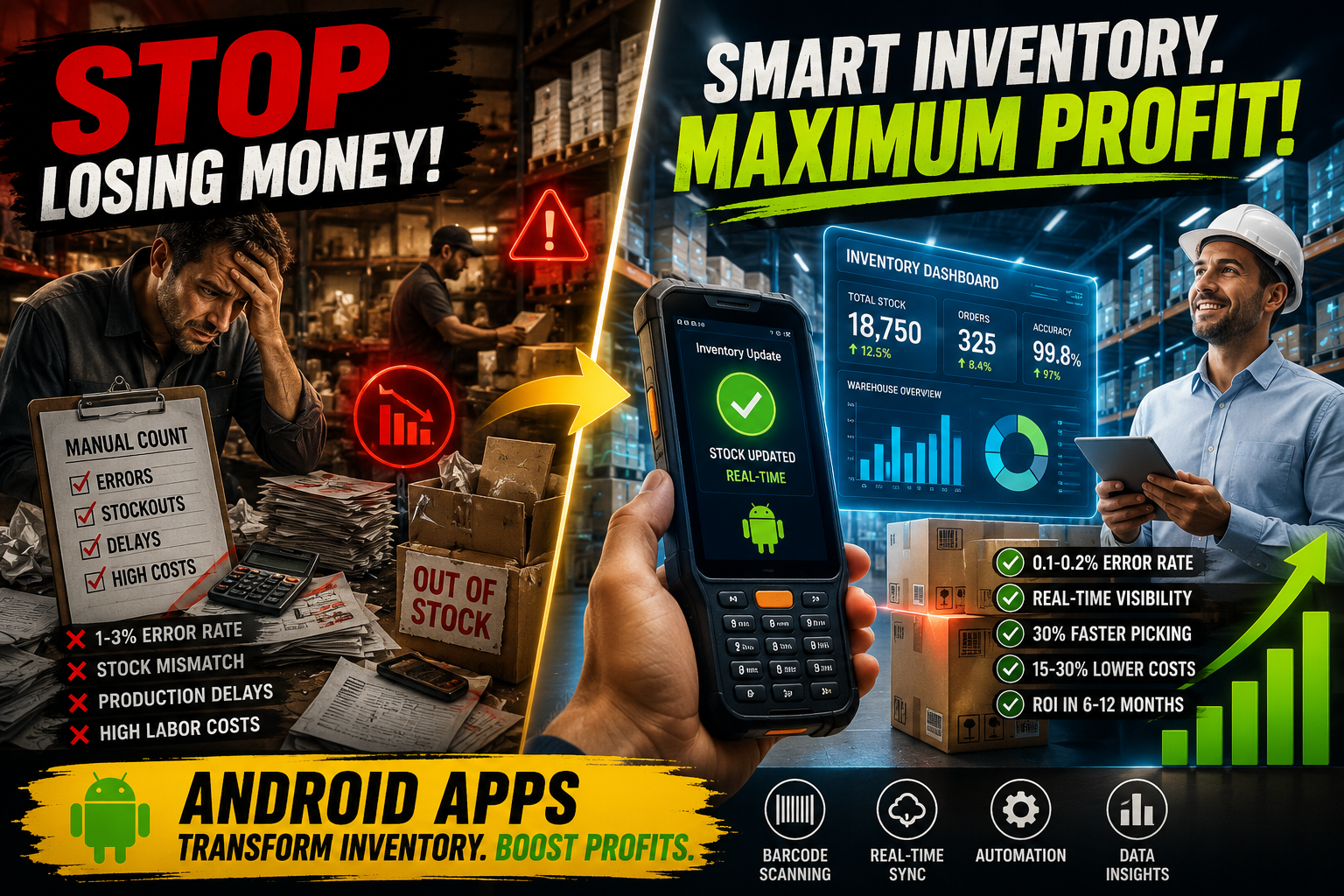
Android apps improve manufacturer inventory tracking by replacing manual counts and spreadsheets with real-time barcode/RFID scanning, automated stock updates, and mobile dashboards. This cuts data-entry errors from roughly 1–3% (manual) to 0.1–0.2% (scanned), speeds up picking by up to 30%, and gives managers live visibility across multiple warehouses, work orders, and bills of materials — all from rugged, affordable Android devices already common on factory floors.
Key Takeaways
- Manual inventory tracking typically produces a 1–3% error rate; barcode scanning on Android devices brings that down to 0.1–0.2%, a reduction of over 90%.
- Android-based barcode workflows can cut data-entry errors by up to 85% and improve inventory accuracy by up to 97%.
- Automation combined with mobile scanning can boost warehouse efficiency by up to 50% while reducing staffing needs by as much as 40%.
- Real barcode-system rollouts report 15–30% lower labor costs and 25–30% lower inventory holding costs for manufacturing clients.
- Android’s open ecosystem and lower hardware cost (versus proprietary WMS terminals) make it the most accessible platform for small and mid-sized manufacturers to digitize warehouse operations.
- Most manufacturers see ROI within 6–12 months of deployment.
1. Why Manufacturers Are Moving Warehouse Operations to Android
Manufacturers run on tight margins, and inventory mistakes are expensive in a way retail mistakes usually aren’t — a missing component doesn’t just delay a sale, it can stop an entire production line. That’s the core reason so many manufacturers have shifted from paper counts and spreadsheets to Android-based inventory apps over the last few years.
Android has become the default mobile platform for warehouse floors for a practical reason: it’s an open operating system that runs on everything from a $150 consumer phone to a $2,500 rugged, drop-proof handheld with a built-in laser scanner. That flexibility means a small manufacturer can pilot a solution cheaply, and a large one can scale to hundreds of ruggedized devices without being locked into one hardware vendor.
Inventory apps built on Android connect directly to warehouse management systems (WMS) and enterprise resource planning (ERP) platforms, so a scan on the floor updates stock counts, bills of materials, and purchase requirements almost instantly. Warehouse management apps for Android and iPhone let organizations control inventory, streamline warehouse operations, and maintain accurate stock visibility through structured workflows enhanced by automation and intelligent data analysis, and increasingly use AI-assisted capabilities to forecast demand, optimize storage allocation, and reduce manual tracking errors rather than relying on disconnected spreadsheets or legacy paper systems.
2. The Core Problems Android Apps Solve
Before looking at benefits, it helps to understand what’s actually broken in manual, non-Android inventory workflows:
- Manual data entry is inherently error-prone. Research on manual data entry shows that humans make a mistake in roughly one out of every 300 characters typed, which adds up to about 18 errors per hour.
- Paper counts create lag. By the time a spreadsheet is updated, the physical stock has already moved again.
- No real-time visibility across sites. Manufacturers running multiple warehouses or production lines can’t see accurate combined stock levels without manual reconciliation.
- Stockouts halt production. A missing raw material or component discovered too late can stop an assembly line for hours or days.
- Audits take too long. Physical inventory counts done by hand can take a full shift or longer, pulling staff away from production.
Android inventory apps target each of these directly by moving data capture to the point of activity — the scan happens where the item is, not later at a desk.
3. How Android Apps Actually Improve Inventory Tracking
Direct Answer
Android apps improve inventory tracking primarily through barcode/RFID scanning that replaces manual counting, instant synchronization with a central WMS or ERP, and mobile dashboards that give floor staff and managers the same real-time numbers.
Supporting Explanation
When a worker scans a barcode instead of writing down or typing a SKU and quantity, the transaction is captured exactly as it exists on the label — no transcription, no rounding, no guessing. That data is transmitted immediately to the central system, so every device on the network (including managers’ phones and the ERP dashboard) reflects the same number within seconds.
Real Example
A distribution center saw an 80% drop in lost items after adopting barcode scanning, saving over $60,000 in a single year, and automation combined with scanning boosted warehouse efficiency by up to 50% while reducing staffing needs by as much as 40%. On the accuracy side, manual inventory entry typically carries an error rate of 1–3%, while barcode scanning consistently achieves 0.1–0.2%, a reduction of more than 90%.
Bullet Summary
- Scan-based capture eliminates transcription errors
- Real-time sync keeps every device and system aligned
- Fewer lost items and faster stock reconciliation
- Data feeds directly into demand forecasting and reorder triggers
Accuracy and Error Reduction
Barcode scanning can improve inventory accuracy by up to 97% according to industry reports, while reducing data entry errors by up to 85% by removing the need for manual keying. For manufacturers tracking raw materials, work-in-progress, and finished goods simultaneously, that accuracy gap compounds — a small error at the raw-material stage can cascade into an inaccurate finished-goods count downstream.
Speed and Labor Efficiency
Barcode scanning workflows typically cut errors by around 67% compared to manual entry and speed up picking by roughly 30%, giving warehouse teams near real-time stock visibility during high-volume periods. Manufacturing clients implementing barcode systems typically report a 25–30% reduction in inventory holding costs, since accurate real-time data reduces the safety stock needed to buffer against uncertainty.
Cost Impact
Most businesses achieve ROI within 6–12 months of implementing a barcode inventory system, with payback coming from reduced labor costs (15–30% savings in warehouse operations) and lower error rates. One retail case cited in industry research saw labor costs decrease by 38% while accuracy improved to 99.8% after implementation — a pattern manufacturers report as well when they digitize receiving, putaway, and cycle counting.
Traceability for Compliance
Manufacturing has stricter compliance needs than most retail environments — recalls, lot tracking, and quality audits all depend on precise records. Advanced barcodes can store manufacturing dates, batch numbers, expiration dates, and supplier details, which is critical in industries like manufacturing where recalls and quality control are high priorities. An Android scanning app makes this traceability searchable in seconds instead of requiring a paper trail hunt.
4. Key Features to Look for in a Manufacturing Inventory App
| Feature | Why It Matters for Manufacturers |
| Barcode/QR/RFID scanning | Captures accurate data at the point of activity |
| Bill of Materials (BOM) tracking | Links raw materials to finished products automatically |
| Multi-warehouse/multi-site visibility | Gives accurate combined stock across locations |
| Lot/serial/expiry tracking | Supports recalls, quality control, and compliance |
| Auto reorder points | Prevents stockouts that halt production |
| Offline mode | Keeps scanning working in low-signal warehouse zones |
| ERP/accounting integration | Avoids duplicate data entry across systems |
| Rugged device compatibility | Withstands drops, dust, and daily factory use |
| Role-based dashboards | Gives floor staff and managers the view they each need |
Several established platforms illustrate how these features come together in practice. Fishbowl is widely used by small and medium-sized manufacturers and distributors, integrating advanced inventory features into QuickBooks with multi-location tracking, bills of materials, auto reorder points, and EDI integrations. For larger operations, Infor M3 is a cloud-based ERP built specifically for manufacturing and distribution, offering robust analytics across multiple companies, countries, and sites. And for production-focused small manufacturers, Katana Cloud Inventory is a cloud-based inventory and production management platform primarily aimed at small to medium-sized manufacturers, combining real-time inventory with manufacturing operations management.
5. Real Example: A Mid-Size Manufacturer’s Before/After
Consider a mid-size electronics component manufacturer running two warehouses and a production floor, previously tracking inventory with a shared spreadsheet updated at shift changes.
Before:
- Stock counts were often 24–48 hours out of date
- Production delays occurred monthly due to “phantom” stock that wasn’t actually on the shelf
- Physical counts required a full weekend, twice a year
After adopting an Android scanning app tied to their ERP:
- Every receiving, putaway, and pick transaction updates stock in real time
- Reorder points trigger purchase requests automatically before a component runs out
- Cycle counts happen in rolling batches during normal shifts instead of a full shutdown
This mirrors the pattern reported industry-wide: a well-known apparel manufacturer faced a 15% cancellation rate for online orders during a period of inventory inaccuracy, underscoring how quickly poor visibility turns into lost revenue — and how much is recovered once real-time scanning closes that gap.
6. Barcode vs. RFID vs. Manual Tracking
| Method | Typical Accuracy | Speed | Best For | Relative Cost |
| Manual entry | 97–99% (1–3% error rate) | Slowest | Very small operations, low SKU count | Lowest upfront, highest long-term labor cost |
| Barcode scanning (Android) | 99.8–99.9% (0.1–0.2% error rate) | Fast | Most manufacturers and warehouses | Low-to-moderate |
| RFID | 99%+ with bulk-read capability | Fastest for bulk counts | High-volume, high-SKU operations, pallet-level tracking | Higher (tags + readers) |
Small back rooms with a single location and low SKU count can typically operate with 97–99% accuracy on active SKUs, while ecommerce or wholesale warehouses with many daily picks should target 99%+ accuracy, especially at pick faces. Manufacturers with multiple locations and complex bills of materials generally need to aim toward the higher end of that range, since errors compound across production stages.
7. Step-by-Step: Implementing an Android Inventory App on Your Warehouse Floor
- Audit current inventory processes. Identify where errors and delays happen today (receiving, putaway, picking, or counting).
- Choose an app that integrates with your existing ERP/accounting system. Avoid creating a second system of record.
- Select appropriate hardware. Consumer Android phones with a case work for light use; rugged handheld scanners are better for daily, high-volume, or harsh environments.
- Label everything consistently. Barcode/QR labels need a consistent format across raw materials, work-in-progress, and finished goods.
- Pilot in one zone or warehouse first. Test scanning workflows on a smaller scale before a full rollout.
- Train floor staff on the actual workflow, not just the app. Include what to do when a scan fails or a label is damaged.
- Set reorder points and alerts. Configure automatic notifications before stock runs critically low.
- Run a parallel count for two weeks. Compare app-reported numbers against a manual spot-check to validate accuracy.
- Roll out to all sites. Expand once the pilot’s accuracy and speed targets are met.
- Review and adjust quarterly. Inventory needs shift with production volume — revisit reorder points and workflows regularly.
8. Best Practices for Warehouse Android Deployments
- Standardize barcode formats across every warehouse and production line to avoid mismatched scans.
- Maintain scanning equipment regularly. Routine maintenance and calibration, including cleaning scanners of dust and debris, keeps accuracy consistent over time.
- Run regular inventory audits. Audits help identify discrepancies between physical inventory and digital records so the system stays accurate, rather than assuming scanned data is always perfectly reconciled.
- Use offline-capable apps for warehouse zones with weak Wi-Fi coverage — data should sync automatically once connectivity returns.
- Assign device ownership so each device (or each shift) has an accountable user, reducing damage and loss.
- Integrate scanning with your BOM so raw material consumption automatically deducts from stock as production orders complete.
9. Common Mistakes Manufacturers Make (And How to Avoid Them)
- Buying hardware before choosing software. The app’s requirements should determine the device, not the reverse.
- Skipping staff training on exception handling. Workers need to know what to do when a label won’t scan — not just how to scan when everything works.
- Running two systems in parallel indefinitely. Keeping the old spreadsheet “just in case” undermines the accuracy gains and creates conflicting records.
- Ignoring offline scenarios. Warehouses often have dead zones; an app that can’t queue scans offline will create gaps in the data.
- Not integrating with the ERP. A standalone inventory app that doesn’t talk to accounting or production planning just creates another silo.
- Treating go-live as the finish line. Ongoing audits and equipment maintenance are what keep accuracy high over time, not a one-time rollout.
10. Pros and Cons of Android-Based Warehouse Systems
Pros
- Lower hardware cost than proprietary WMS terminals
- Wide app ecosystem and easy integration with ERP/accounting tools
- Rugged device options built specifically for warehouse and manufacturing use
- Real-time visibility across multiple warehouses and production stages
- Scales from a single small warehouse to enterprise multi-site operations
Cons
- Requires reliable Wi-Fi or offline-sync capability to avoid data gaps
- Initial setup (labeling, integration, training) takes real time and planning
- Device damage and loss management needs a clear policy
- Choosing the wrong app can create a data silo instead of solving the problem
Expert Tips for Long-Term Accuracy
Expert Tip: Set differentiated accuracy targets by SKU importance. A multi-location manufacturing operation should target tighter accuracy on high-turnover, high-value SKUs than on low-priority ones, since the cost of an error scales with order volume and complexity.
Expert Tip: Treat cycle counting as continuous, not annual. Rolling cycle counts during normal operations catch discrepancies early, instead of discovering a year’s worth of drift during one disruptive full shutdown.
Important Note: Barcode and RFID technology reduces errors dramatically but does not eliminate the need for process discipline — a scanning system won’t rescue a workflow that leaks errors elsewhere in the process, such as inconsistent labeling or skipped scans during receiving.
Frequently Asked Questions
1. Do Android inventory apps work without internet access on the warehouse floor?
Most modern apps support offline mode, queuing scans locally and syncing once connectivity returns. Confirm this specifically before choosing an app if your facility has dead zones.
2. Are rugged Android scanners necessary, or can regular phones work?
Regular phones can work for lighter use, but daily high-volume scanning in dusty, humid, or drop-prone environments benefits from rugged, purpose-built devices.
3. How much do Android inventory apps typically cost for a small manufacturer?
Pricing varies widely by feature set and integration needs; many platforms scale from affordable small-business tiers to enterprise pricing for multi-site operations.
4. Can Android apps track raw materials and finished goods separately?
Yes — most manufacturing-focused apps support bill of materials tracking, distinguishing raw materials, work-in-progress, and finished goods.
5. How long does it take to see ROI after implementing barcode scanning?
Most businesses achieve ROI within 6–12 months of implementation, driven by labor savings and reduced error-related costs.
6. What accuracy rate should a manufacturer aim for?
Multi-location manufacturing operations should generally target 99%+ accuracy, though the right target depends on SKU count and order volume.
7. Do these apps integrate with QuickBooks or other accounting software?
Many do — Fishbowl, for example, integrates directly with QuickBooks while adding warehouse and manufacturing-specific inventory features.
8. Can one app manage inventory across multiple warehouses?
Yes, multi-location visibility is a standard feature in manufacturing-grade inventory apps, letting managers see combined and per-site stock levels.
9. What’s the difference between barcode and RFID for a manufacturer?
Barcode scanning requires line-of-sight, one item at a time; RFID can read multiple tagged items at once without direct scanning, which is faster for bulk pallet or bin counts but costs more per tag.
10. How do Android inventory apps help prevent production line stoppages?
By triggering automatic reorder alerts before a component drops below a set threshold, giving purchasing teams lead time before a shortage actually halts production.
11. Is staff training difficult for these apps?
Basic scanning workflows are usually intuitive; the harder part is training staff on exception handling — damaged labels, failed scans, and discrepancy reporting.
12. Do Android apps support lot and serial number tracking for recalls?
Yes — barcodes can store manufacturing dates, batch numbers, expiration dates, and supplier details, which supports recall and quality-control requirements common in manufacturing.
13. What happens if a device is dropped or damaged on the floor?
This is why rugged, purpose-built devices are recommended for daily industrial use; assigning device ownership also reduces damage frequency.
14. Can small manufacturers afford to make this switch?
Yes — many platforms are priced for small and medium-sized businesses specifically, and the labor and error-reduction savings often offset the cost within the first year.
15. How often should inventory data be audited even with scanning in place?
Regularly — routine audits help catch discrepancies between physical inventory and system records that can creep in even with barcode systems in place.
Final Conclusion
Android inventory apps solve a problem manufacturers have lived with for decades: inventory data that’s always slightly out of date. By moving data capture to the point of activity — the receiving dock, the pick face, the production line — these apps replace error-prone manual entry with fast, accurate, real-time records. The numbers back this up consistently across independent sources: error rates drop by 90% or more, labor costs fall by double digits, and most manufacturers recover their investment within a year. For manufacturers still relying on spreadsheets or paper counts, the case for switching isn’t really about technology for its own sake — it’s about stopping the production delays, lost items, and audit headaches that inaccurate inventory data causes every single week.