Quick Answer: What Is ERP Software Development for Manufacturing?
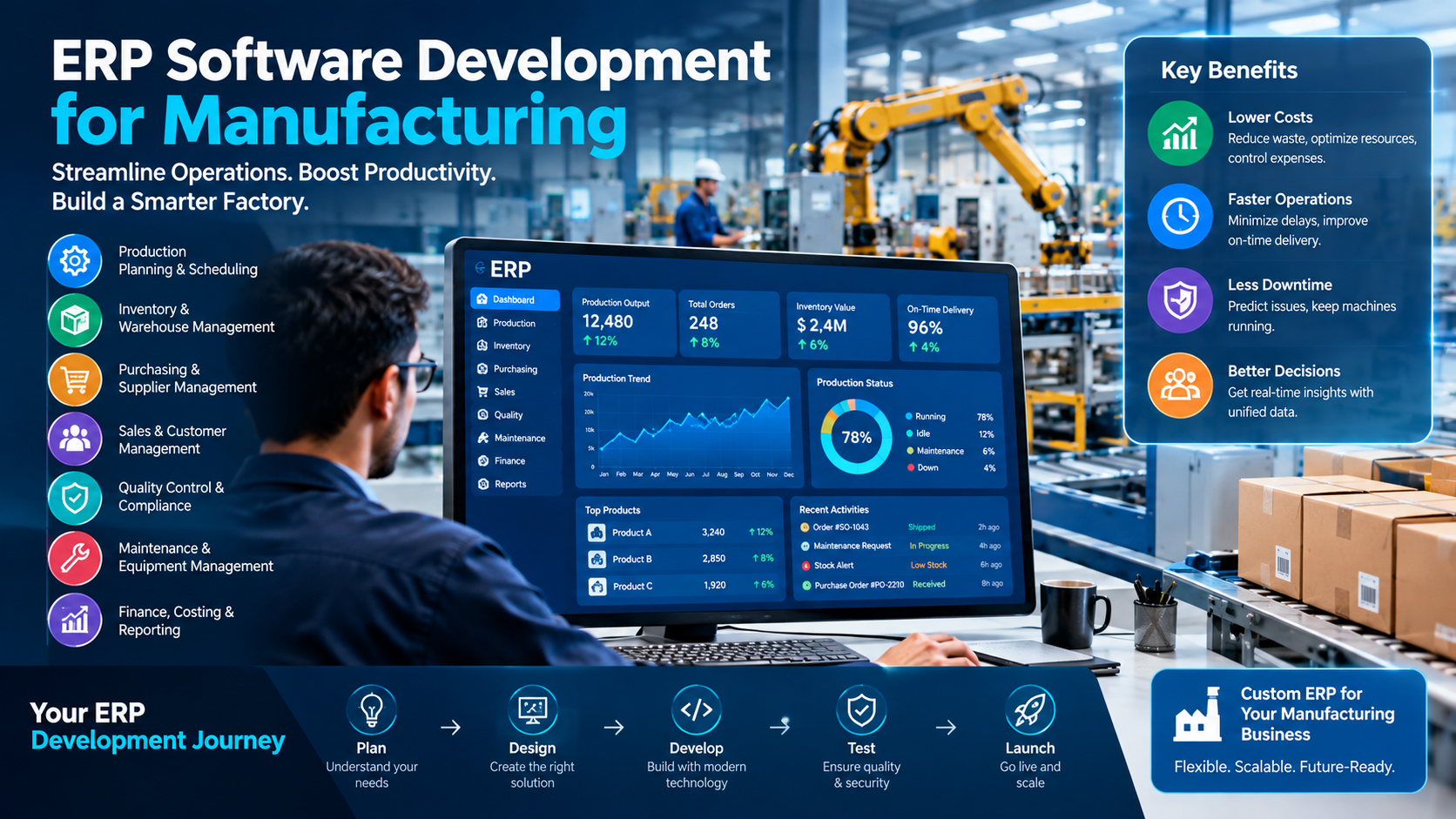
ERP software development for manufacturing is the process of planning, designing, building, and launching a system that connects every part of a factory in one place. This includes production, inventory, purchasing, sales, quality, maintenance, and finance. A custom ERP for manufacturers fits your exact workflow. In 2026, most projects cost between $40,000 and $300,000+, depending on size, features, and how many systems you need to connect.
That is the short version. Now let’s go deeper, in plain words, so you can make a smart choice for your factory.
Table of Contents
- Why Manufacturers Need ERP Software Today
- What Is Manufacturing ERP Software?
- Custom ERP vs. Off-the-Shelf ERP
- Core ERP Features for Manufacturing
- Advanced Features Worth Adding
- Key Benefits of ERP Software Development for Manufacturing
- ERP Development Cost: What You Will Really Pay
- How Long Does ERP Development Take?
- Step-by-Step ERP Development Process
- Best Technology Stack for Manufacturing ERP
- Common Challenges and How to Avoid Them
- How to Choose the Right ERP Development Partner
- ERP Trends in Manufacturing for 2026 and Beyond
- Frequently Asked Questions
- Final Thoughts
1. Why Manufacturers Need ERP Software Today
Running a factory is hard. You have to buy raw materials at the right time. You have to keep machines running. You have to finish orders on schedule. And you have to do all of this while costs go up and customers want faster delivery.
Many manufacturers still run on a mix of spreadsheets, paper forms, and a few disconnected tools. One team tracks stock in Excel. Another team uses a separate app for orders. Finance has its own system. When these tools do not talk to each other, mistakes happen. Someone orders too much steel. Someone else runs out of a small part and the whole line stops.
This is where ERP software development for manufacturing helps. ERP stands for Enterprise Resource Planning. It puts your data in one system, so everyone sees the same numbers at the same time.
The pressure to modernize is real. Deloitte’s 2026 manufacturing outlook points to rising costs, supply chain complexity, and a strong push toward smart manufacturing as the big themes for the year. Factories that connect their data and use it well are in a better position to handle these shocks.
Here are the most common problems that push owners to look for a new ERP:
- Stockouts and overstock. You either run out of parts or you have cash stuck in boxes on a shelf.
- Late orders. Production plans change, but nobody updates the schedule in time.
- Manual data entry. Staff re-type the same numbers in three different places.
- No real-time view. Managers wait until the end of the week to learn what went wrong on Monday.
- Poor traceability. When a customer reports a defect, you cannot quickly find which batch it came from.
- Growth pain. The tools that worked for 10 people break at 50.
If two or three of these sound familiar, an ERP system can help. And if your process is unique, building a custom one may be the best path.
2. What Is Manufacturing ERP Software?
Manufacturing ERP software is a central system that manages all the core activities of a factory. It collects data from every department and shows it on one screen. Instead of ten tools, you use one platform with different modules.
Think of it like the brain of your factory. The machines are the muscles. The workers are the hands. The ERP is the brain that tells everyone what to do next, based on real data.
What a Manufacturing ERP Usually Manages
- Production planning and scheduling
- Bill of materials (BOM) and routing
- Inventory and warehouse control
- Purchasing and supplier management
- Sales orders and customer records
- Quality control and compliance
- Equipment maintenance
- Finance, costing, and reporting
- Human resources and payroll (in some systems)
How Is It Different From Regular ERP?
A general ERP is built for any business. A manufacturing ERP is built for factories. It understands things like multi-level BOMs, work orders, shop floor tracking, batch and lot numbers, machine capacity, scrap, and yield. A retail ERP will not handle these well. That is why the word “manufacturing” matters.
Manufacturing is also the biggest user of this software. According to a set of manufacturing ERP statistics, manufacturers make up the largest share of ERP users of any industry. This makes sense. Factories have more moving parts than almost any other business type.
What Does “ERP Software Development” Mean?
There are three ways to get an ERP:
- Buy a ready-made product and use it as it comes.
- Buy a ready-made product and customize it.
- Build a custom system from scratch with a development team.
“ERP software development” usually means options 2 and 3. You work with a software company to design a system around how your factory really works. You do not bend your process to fit the tool. The tool bends to fit you.
3. Custom ERP vs. Off-the-Shelf ERP
This is one of the biggest questions owners ask. Both paths can work. The right choice depends on your size, budget, and how special your process is.
Off-the-Shelf ERP
These are products you license, such as SAP, Oracle NetSuite, Microsoft Dynamics, Odoo, or Epicor. They come with many ready-made features.
Pros:
- Faster to start
- Lower upfront cost
- Proven and widely used
- Regular updates from the vendor
Cons:
- You pay license fees every year, often per user
- Features you do not need still add cost
- Hard to change for unusual workflows
- You depend on the vendor’s roadmap
Custom ERP for Manufacturers
A custom ERP is built just for your business.
Pros:
- Fits your exact process, with no extra clutter
- You own the code and the data
- No per-user license fees
- Easy to connect to your machines, sensors, and other tools
- Can become a real competitive edge
Cons:
- Higher upfront cost
- Takes longer to build
- Needs a strong development partner
- You must plan for support and updates
Quick Comparison Table
| Factor | Off-the-Shelf ERP | Custom ERP |
| Upfront cost | Lower | Higher |
| Long-term cost | Grows with users and licenses | More stable |
| Time to launch | Weeks to months | Months |
| Fit to your process | Good, not perfect | Excellent |
| Ownership | Vendor owns it | You own it |
| Flexibility | Limited | High |
| Best for | Standard processes | Unique or complex processes |
A Simple Rule of Thumb
If 80% or more of your process is standard, start with a ready-made ERP. If your process is unique, if you use special machines, or if your workflow is your secret advantage, a custom or hybrid ERP usually pays off. Many factories choose a hybrid path: start with a strong base product and build custom modules on top.
4. Core ERP Features for Manufacturing
Not every feature is equal. Below are the must-have ERP features for manufacturing. If a system lacks these, keep looking.
4.1 Production Planning and Scheduling
This is the heart of any factory ERP. It decides what to make, when to make it, and on which machine.
What good looks like:
- Create work orders from sales orders in a few clicks
- See machine and labor capacity in one view
- Drag-and-drop scheduling with live updates
- Alerts when a job is late or a machine is down
- Support for make-to-order, make-to-stock, and engineer-to-order models
A strong planning module cuts idle time and helps you promise delivery dates you can keep.
4.2 Bill of Materials (BOM) Management
A BOM is the recipe for your product. It lists every part, material, and quantity needed.
Look for:
- Multi-level BOMs (parts inside parts)
- Version control, so old and new designs do not get mixed
- Alternate parts, in case a supplier runs out
- Cost roll-up that shows the true cost of each product
- Easy links to engineering changes
Bad BOM data is one of the top causes of production errors. A good ERP keeps this data clean.
4.3 Inventory and Warehouse Management
Inventory is cash on a shelf. You want enough to keep running, but not so much that you tie up money.
Key capabilities:
- Real-time stock levels across all locations
- Barcode and QR code scanning
- Batch, lot, and serial number tracking
- Reorder points and safety stock rules
- Cycle counting without stopping work
- Raw material, work-in-progress (WIP), and finished goods tracking
When stock data is right, you buy only what you need. That frees cash and reduces waste.
4.4 Material Requirements Planning (MRP)
MRP looks at your orders and your BOMs. Then it tells you what to buy and when to buy it.
A good MRP module:
- Calculates material needs from demand forecasts and orders
- Suggests purchase orders automatically
- Considers supplier lead times
- Flags shortages before they hit the line
This one feature alone can save a plant from many costly stoppages.
4.5 Shop Floor Control
Shop floor control links the office to the factory floor.
What it includes:
- Operators clock in and out of jobs on a tablet or terminal
- Real-time progress tracking for each work order
- Capture of scrap, rework, and downtime reasons
- Digital work instructions and drawings
- Labor and machine time tracking for accurate costing
Without this, your ERP only knows what the plan was. With it, the ERP knows what really happened.
4.6 Quality Management
Quality problems cost money and trust. A built-in quality module helps you stay in control.
Core functions:
- Inspection plans at receiving, in-process, and final stages
- Non-conformance reports (NCRs) and corrective actions (CAPA)
- Full traceability from raw material to finished product
- Support for ISO 9001, ISO 13485, IATF 16949, and similar standards
- Certificates and audit records stored in one place
If you serve auto, medical, food, or aerospace customers, this is not optional.
4.7 Purchasing and Supplier Management
Your suppliers matter as much as your machines.
Features to expect:
- Purchase requests, approvals, and purchase orders
- Supplier scorecards (on-time rate, quality, price)
- Price history and contract tracking
- Automatic matching of purchase order, receipt, and invoice
- A supplier portal for order updates
Better purchasing data gives you more power in price talks.
4.7 Sales and Order Management
This part connects your customers to your factory.
Key points:
- Quotes with accurate cost and lead time
- Order entry and tracking
- Customer-specific pricing and terms
- Available-to-promise (ATP) dates based on real stock and capacity
- Shipping, packing lists, and invoices
When sales can see real capacity, they stop promising what the plant cannot deliver.
4.8 Financial Management and Costing
Every transaction in the factory has a money side. The ERP should link them.
Must-haves:
- General ledger, accounts payable, and accounts receivable
- Job costing and standard costing
- Overhead allocation
- Margin reports by product, customer, or order
- Multi-currency and multi-entity support if you sell globally
This is how you learn which products make money and which ones only look busy.
4.9 Maintenance Management
Machines break. The goal is to fix them before they stop your line.
Look for:
- Preventive maintenance schedules
- Work orders for repairs
- Spare parts inventory
- Machine history and downtime records
- Overall Equipment Effectiveness (OEE) tracking
Planned maintenance costs far less than emergency repair.
4.10 Reporting and Dashboards
Data is only useful when people can read it.
Good dashboards show:
- On-time delivery rate
- Production output vs. plan
- Inventory turns
- Scrap and yield rates
- Cash flow and margin
Choose a system that lets managers build and change reports without calling a developer every time.
5. Advanced Features Worth Adding
Once the core is in place, these features can lift your factory to the next level. You do not need all of them on day one. Add them in phases.
5.1 IoT and Machine Integration
IoT sensors and machine connections feed live data into your ERP. You can see machine status, cycle times, temperature, and output without anyone typing a thing. This supports Industry 4.0 goals and cuts manual entry.
5.2 AI and Predictive Analytics
AI can look at past data and spot patterns people miss. In a factory ERP, it can:
- Forecast demand more accurately
- Predict when a machine might fail
- Suggest better production schedules
- Flag odd quality trends early
- Recommend reorder quantities
AI is not magic. It needs clean data. That is one more reason to build a solid ERP base first.
5.3 Advanced Planning and Scheduling (APS)
APS goes beyond basic scheduling. It looks at many limits at once, such as machines, tools, people, and materials. Then it builds the best possible schedule. This is very helpful for complex, high-mix plants.
5.4 Supply Chain Visibility
Track orders from your suppliers all the way to your customers. Share data with partners through portals or APIs. When a delay happens upstream, you know early and can react.
5.5 Mobile Apps
Tablets and phones let supervisors approve orders, check stock, or review dashboards from anywhere. Operators can scan barcodes right at the machine. Mobile access turns the ERP from a desk tool into a floor tool.
5.6 Product Lifecycle Management (PLM) Links
Connect design data from CAD and PLM tools to your BOMs. When engineering changes a part, the ERP updates automatically. No more old drawings on the shop floor.
5.7 Sustainability and Compliance Tracking
Many buyers now ask for carbon and waste data. An ERP can track energy use, scrap, and material sources. This helps you meet reporting rules and win contracts that require proof.
5.8 Customer and Dealer Portals
Let customers check order status, download certificates, and place repeat orders on their own. This saves your sales team hours of email every week.
6. Key Benefits of ERP Software Development for Manufacturing
Now let’s look at what you actually get. These are the benefits of manufacturing ERP software that owners talk about most.
6.1 One Source of Truth
Everyone works from the same data. Sales, production, purchasing, and finance all see the same numbers. Arguments about “whose spreadsheet is right” go away.
6.2 Better Inventory Control
Real-time stock data means fewer stockouts and less excess. Many factories free up a large amount of working capital in the first year just by cleaning up inventory.
6.3 Higher Productivity
When planning, scheduling, and tracking are automated, people spend less time on paperwork and more time on real work. Machines also sit idle less often because the right materials show up on time.
6.4 Lower Costs
ERP helps you cut costs in many places at once:
- Less scrap and rework
- Lower purchasing costs through better planning
- Less overtime from last-minute rush jobs
- Fewer emergency repairs
- Lower admin cost from reduced manual work
6.5 Faster, Smarter Decisions
Live dashboards let leaders act on today’s facts instead of last month’s report. If a key machine is down, you know now, not on Friday.
6.6 Improved Quality and Traceability
When every batch is tracked, a recall that once took weeks can take hours. You can show auditors a full record on demand. Customers trust suppliers who can prove quality.
6.7 On-Time Delivery
Better planning and real capacity data lead to realistic promises. On-time delivery goes up, and so does customer loyalty.
6.8 Easier Compliance
ERP stores records, certificates, and audit trails in one place. This makes it far easier to pass inspections and meet rules like ISO standards or FDA requirements.
6.9 Room to Grow
A well-built ERP scales with you. Add a new plant, a new product line, or a new country without starting over.
6.10 Stronger Customer Experience
Accurate quotes, reliable dates, and fast answers to “where is my order?” all make customers happier. Happy customers reorder.
Benefits of Custom ERP Specifically
A custom system adds a few extra wins:
- No wasted features. You pay only for what you use.
- No per-user fees. Add 20 more users without a bigger bill.
- Deep integration. Connect to your exact machines and legacy tools.
- Competitive edge. Your best process becomes software that rivals cannot copy.
- Full control. You decide the roadmap and the release dates.
The ‘right’ ERP is not the one with the most features. It is the one your people will actually use every day.
7. ERP Development Cost: What You Will Really Pay
Let’s talk about money. ERP development cost is the question every owner asks first, and the honest answer is: it depends. The price changes with your size, your features, your team, and how clean your data is.
Below are typical 2026 ranges to help you plan. Treat them as rough estimates, not quotes. Real prices vary by country, team, and scope.
Typical Cost Ranges for Custom Manufacturing ERP
| Project Size | Typical Scope | Estimated Cost (USD) | Typical Timeline |
| Small | 3 to 5 core modules, one plant, under 50 users | $40,000 to $100,000 | 3 to 6 months |
| Mid-size | 6 to 10 modules, shop floor tracking, a few integrations | $100,000 to $300,000 | 6 to 12 months |
| Large | Full suite, multi-plant, IoT, AI, many integrations | $300,000 to $1,000,000+ | 12 to 24 months |
What Drives the Cost Up or Down?
1. Number of modules and features. Each module adds design, build, and testing time. A simple inventory and production module costs far less than a full suite with APS and AI.
2. Complexity of your process. A plant with simple, repeatable jobs is cheaper to model than a high-mix, low-volume job shop with engineer-to-order products.
3. Integrations. Connecting to accounting tools, CAD files, e-commerce stores, shipping tools, and machines takes work. Every integration adds cost. Machine and IoT links are often the most complex.
4. Data migration. Moving old data into the new system sounds easy. It rarely is. Messy, duplicate, or missing data takes time to clean.
5. User interface and experience. A simple screen costs less than a polished, role-based design with mobile apps and custom dashboards. But good design saves training time, so it often pays for itself.
6. Security and compliance. Industries with strict rules need extra work on audit trails, access control, and data storage.
7. Team location and skill. Hourly rates differ a lot across regions. A skilled offshore team can deliver strong value at lower rates, but you should always check their manufacturing experience, not just their price.
8. Hosting choice. Cloud ERP for manufacturers cuts hardware cost. On-premise systems need servers, backups, and an IT team.
Hidden Costs Many Owners Forget
The build price is only part of the story. Plan for these too:
- Training. People need time to learn the new system.
- Data cleanup. Messy data slows everything down.
- Change management. You may need extra help to move people from old habits to new ones.
- Hardware. Barcode scanners, tablets, and label printers add up.
- Ongoing support. Plan for roughly 15% to 20% of the build cost per year for maintenance, bug fixes, and small updates.
- Downtime during cutover. A rushed go-live can hurt production.
- Scope creep. New feature requests in the middle of a project can quietly add 20% or more to the bill.
One of the manufacturing ERP statistics sources reports that discrete manufacturing ERP projects often run over budget and fail to meet goals when planning is weak. The lesson is simple: plan well, start small, and add features in phases.
Custom ERP vs. Off-the-Shelf: A Cost View Over 5 Years
Here is a simple way to think about it. Off-the-shelf ERP often looks cheaper in year one. But license fees are charged every year, and they grow as you add users. Custom ERP costs more at the start, but you do not pay per-user fees. For a growing factory with many users, the custom path can win by year four or five.
| Cost Item | Off-the-Shelf ERP | Custom ERP |
| Initial setup | Lower | Higher |
| Yearly license fees | Yes, often per user | None |
| Customization | Extra charges | Built in |
| Integration | Often extra | Built to fit |
| Yearly support | Vendor fees | Maintenance plan |
| Change requests | Vendor controlled | You control |
How to Keep ERP Development Cost Under Control
- Start with an MVP. Build the 3 to 4 modules that solve your biggest pain first.
- Write clear requirements. Vague goals lead to expensive rework.
- Use proven tools. Open-source frameworks and cloud services save time.
- Phase your rollout. Launch one plant or one department at a time.
- Get a fixed scope for each phase. This keeps surprises small.
- Involve your floor team early. The people who use the system know what it must do.
- Look for support. In the U.S., the NIST Manufacturing Extension Partnership offers resources and a network of centers that help small and mid-size manufacturers improve operations and adopt technology.
How to Think About ROI
Do not look at cost alone. Look at return. Ask:
- How much cash will better inventory control free up?
- How many hours of manual work will we remove each week?
- How much scrap and rework will we cut?
- How many late orders will we avoid?
- How much will faster quoting help us win new work?
Many manufacturers see payback in two to four years. Some see it sooner when the old process was very manual. Add up your own numbers before you decide.
8. How Long Does ERP Development Take?
The timeline depends on scope. As a guide:
- MVP with core modules: 3 to 6 months
- Full mid-size system: 6 to 12 months
- Large multi-plant system: 12 to 24 months
These numbers include design, build, testing, data migration, training, and go-live. They do not include delays caused by slow decisions, unclear requirements, or poor data.
What Slows Projects Down?
- Unclear or changing requirements
- Key staff who are too busy to give feedback
- Poor data quality
- Too many customizations at once
- Weak project management
- Resistance from users
What Speeds Projects Up?
- A dedicated project owner on your side
- Fast feedback and approvals
- Clean data ready before the build starts
- A phased plan with small, clear goals
- A development partner with real manufacturing experience
9. Step-by-Step ERP Development Process
A clear process keeps the project on track. Here is the path most strong teams follow.
Step 1: Discovery and Goal Setting
Start with questions. What hurts today? What do you want to fix first? What does success look like in numbers? Examples: cut stockouts by half, raise on-time delivery to 95%, or save 20 hours of manual work per week.
Step 2: Process Mapping
Map how work really flows, from quote to cash. Walk the floor. Talk to operators, supervisors, buyers, and planners. The real process is often different from the written one. This step finds waste you can remove before you build anything.
Step 3: Requirements and Scope
Turn your goals into a clear list of features, users, reports, and integrations. Rank each item as must-have, should-have, or nice-to-have. This ranking keeps the first release focused.
Step 4: Architecture and Design
The team picks the technology, database design, and security plan. They also design the screens. For manufacturing, this includes designing for tablets, scanners, and shop floor terminals. Good design is simple. Operators should not need a manual.
Step 5: Build in Sprints
The team builds the system in short cycles, usually two to three weeks each. After each sprint, you see a working demo. This lets you catch problems early, not at the end.
Step 6: Integration
Connect the ERP to your other tools, such as accounting software, CAD systems, e-commerce platforms, shipping carriers, and machines. Test each link carefully.
Step 7: Data Migration
Move your items, BOMs, customers, suppliers, open orders, and stock levels into the new system. Clean the data first. Run test imports. Check the numbers with the people who know them best.
Step 8: Testing
Test with real scenarios, not just test scripts. Run a full order from quote to invoice. Try a rush order. Try a returned batch. Test with real users on real devices. Include load tests so the system stays fast when many people use it at once.
Step 9: Training
Train people by role. An operator needs a short, hands-on session. A planner needs more depth. Provide quick guides and short videos. Name a few “super users” who can help their teammates.
Step 10: Go-Live
There are three common styles:
- Big bang: Switch everything at once. It is fast but risky.
- Phased: Switch one module or department at a time. It is safer.
- Parallel: Run old and new systems together for a short time. It is the safest but needs extra effort.
Most factories choose the phased approach.
Step 11: Support and Improvement
The work does not end at go-live. Collect feedback. Fix bugs fast. Add new features in small releases. Review your goals every quarter to see if the ERP is delivering.
10. Best Technology Stack for Manufacturing ERP
You do not need to be a developer to make smart choices here. But it helps to know the basics, so you can ask good questions.
Cloud vs. On-Premise
Cloud ERP for manufacturers is now the most popular choice. Here is why:
- Lower upfront hardware cost
- Easy access from any plant or device
- Automatic backups and updates
- Simple to scale
- Strong security from major cloud providers
On-premise ERP still makes sense if you have strict data rules, poor internet at your plant, or very special needs. A hybrid approach is also common: the core system lives in the cloud, while shop floor tools run locally to keep working even when the internet drops.
Common Technology Choices
| Layer | Popular Options |
| Front end | React, Angular, Vue |
| Back end | Node.js, Python (Django), Java (Spring), .NET |
| Database | PostgreSQL, MySQL, SQL Server |
| Cloud | AWS, Microsoft Azure, Google Cloud |
| Mobile | React Native, Flutter |
| Integration | REST APIs, GraphQL, message queues |
| Machine data | MQTT, OPC UA |
| Reporting | Power BI, Metabase, custom dashboards |
What Matters Most in Your Tech Choice
- Scalability. Can it grow with you?
- Security. Does it protect your designs, customer data, and finances?
- API-first design. Can other tools connect easily?
- Offline support. Can the floor keep working if the network fails?
- Easy upgrades. Can you add features without breaking old ones?
- Talent availability. Can you easily find developers who know this stack?
Security Basics for ERP
Your ERP holds your most sensitive data. Insist on:
- Role-based access, so people see only what they need
- Encryption for data at rest and in transit
- Multi-factor sign-in
- Detailed audit logs
- Regular backups and tested recovery plans
- Regular security testing
11. Common Challenges and How to Avoid Them
ERP projects can go wrong. Knowing the usual traps helps you avoid them.
Challenge 1: Unclear Goals
Problem: The team builds features nobody needs. Fix: Set clear, measurable goals before writing any code. Tie every feature to a goal.
Challenge 2: Poor Data Quality
Problem: Old data is messy, so the new system starts with wrong numbers. Fix: Clean and check your data before migration. Assign owners for each data set.
Challenge 3: User Resistance
Problem: Staff keep using spreadsheets because they do not trust the new tool. Fix: Involve users early. Show them how the system saves them time. Train well. Celebrate early wins.
Challenge 4: Scope Creep
Problem: New requests keep piling up and the budget grows. Fix: Keep a written scope. Put new ideas on a backlog for the next phase.
Challenge 5: Over-Customization
Problem: Everything is custom, so the system is hard to maintain. Fix: Customize only what gives you a real advantage. Use standard patterns for everything else.
Challenge 6: Weak Integration
Problem: The ERP does not connect well to machines or other tools, so people still enter data twice. Fix: Plan integrations early. Test them in real conditions.
Challenge 7: Underestimating Change Management
Problem: Leaders treat the project as a pure IT task. Fix: Treat it as a business change. Name a sponsor from the leadership team. Communicate often.
Challenge 8: Choosing a Partner Based on Price Alone
Problem: The cheapest bid leads to rework, delays, and bad quality. Fix: Judge partners on experience, process, references, and communication, not only on price.
Top 10 ERP Mistakes in a Quick List
- Skipping process mapping
- Trying to launch everything at once
- Ignoring floor-level users
- Not cleaning data first
- Underfunding training
- Customizing too much
- Having no internal project owner
- Forgetting about support after launch
- Ignoring security
- Not measuring results
12. How to Choose the Right ERP Development Partner
Your partner can make or break the project. Use this checklist.
Look for Manufacturing Experience
Ask for case studies from factories like yours. A team that understands BOMs, work orders, and shop floor reality will ask better questions and make fewer mistakes.
Check Their Process
A good partner has a clear process: discovery, design, sprints, testing, training, and support. Ask how they handle changes, risks, and reporting.
Ask About Team and Skills
Who will work on your project? Ask about business analysts, architects, developers, testers, and a project manager. Make sure the people you meet are the people who will do the work.
Review Their Communication
Do they reply fast? Do they explain things in plain words? Will you get weekly updates and regular demos? Poor communication early on usually means bigger trouble later.
Confirm Ownership and Support
Make sure the contract says you own the code and data. Ask what support looks like after launch, including response times and costs.
Ask for References
Talk to past clients. Ask what went well, what went wrong, and whether they would hire the team again.
Questions to Ask Before You Sign
- Have you built ERP systems for manufacturers like us?
- How do you handle changes in scope?
- Who owns the source code and data?
- How do you test and secure the system?
- What does post-launch support include?
- How will you train our people?
- Can you show us a similar project you delivered?
- How do you report progress?
At HT Business Group, we build custom software for businesses in the US and UK, and we start every ERP project by understanding your floor, your goals, and your data. That way, the system we deliver fits how you work, not the other way around.
13. ERP Trends in Manufacturing for 2026 and Beyond
The ERP space keeps changing. Here are the trends worth watching.
Smart Manufacturing Becomes the Default
Connected machines, live data, and automation are no longer “future tech.” They are becoming standard. Deloitte’s 2026 outlook highlights smart manufacturing and AI as top investment themes, and an ERP is the data base that makes them work.
AI Assistants Inside the ERP
Expect more AI helpers that answer questions in plain language, such as “Which orders are at risk this week?” or “Why did scrap go up on Line 3?” These tools save time for planners and managers.
Composable and Modular ERP
Instead of one giant system, more factories build a core ERP and add small, specialized modules as needed. This keeps costs lower and makes change easier.
Real-Time Supply Chain Visibility
Buyers want to see where orders are at any moment. ERPs are adding live tracking, supplier portals, and early warning alerts for delays.
Sustainability Reporting
Customers and regulators ask for data on energy, waste, and materials. ERPs now track this data as part of normal operations.
Low-Code Tools for Power Users
Low-code features let trained staff build simple screens, reports, and workflows without waiting for developers. This speeds up small improvements.
Cybersecurity as a Core Feature
As factories connect more machines, security matters more. Modern ERPs treat security as a first-class feature, not an add-on.
Skills and Workforce Support
Worker skills are a top concern for many leaders. ERPs with simple screens, built-in guidance, and digital work instructions help new workers learn faster.
14. Frequently Asked Questions
What is ERP software development for manufacturing?
It is the process of planning, designing, building, and launching a system that connects production, inventory, purchasing, quality, sales, and finance in one platform. The system is built or customized to match how a specific factory works.
How much does custom manufacturing ERP software cost?
Most custom projects range from about $40,000 for a small, focused system to $300,000 or more for a mid-size to large system. Very large, multi-plant projects can pass $1,000,000. Your final cost depends on modules, integrations, data migration, and team rates.
How long does it take to build a manufacturing ERP?
An MVP with core modules usually takes 3 to 6 months. A full mid-size system takes 6 to 12 months. Large, multi-plant systems can take 12 to 24 months.
What are the most important ERP features for manufacturing?
The must-haves are production planning, BOM management, inventory control, MRP, shop floor tracking, quality management, purchasing, sales order management, financials, and reporting. Add IoT, AI, and APS as you grow.
Is custom ERP better than off-the-shelf ERP?
Not always. Off-the-shelf works well for standard processes and smaller budgets. Custom ERP is better when your process is unique, when you want to own your system, or when per-user license fees would grow too high.
What are the main benefits of ERP for manufacturers?
The main benefits are one source of truth, better inventory control, higher productivity, lower costs, faster decisions, stronger quality and traceability, on-time delivery, easier compliance, and room to scale.
Can a small manufacturer afford ERP?
Yes. Small manufacturers can start with a focused MVP or a cloud-based product. Phased rollouts keep upfront cost low. Programs like the NIST MEP network can also help small and mid-size manufacturers plan technology upgrades.
Should I choose cloud or on-premise ERP?
Most manufacturers now choose cloud ERP for lower upfront cost, easy access, and simple updates. On-premise or hybrid setups make sense when you have strict data rules or unstable internet at your plant.
How do I make sure my ERP project succeeds?
Set clear goals, map your real process, clean your data, start with an MVP, involve floor users early, train well, and pick a partner with real manufacturing experience.
Can ERP connect to my machines?
Yes. With IoT sensors and standard protocols like MQTT and OPC UA, an ERP can collect live data from machines. This removes manual entry and gives you real-time views of output and downtime.
What is the difference between ERP and MES?
ERP manages the business side: orders, inventory, purchasing, and finance. MES (Manufacturing Execution System) manages what happens on the shop floor in real time. Many modern ERPs include MES features, or connect to a separate MES tool.
How much should I budget for ERP maintenance?
Plan for about 15% to 20% of the build cost each year. This covers bug fixes, updates, security patches, and small improvements.
15. Final Thoughts
A factory runs on timing, materials, people, and machines. When these parts work in sync, you deliver on time, keep costs down, and earn loyal customers. When they do not, everything feels like a fire drill.
ERP software development for manufacturing gives you the tool to bring all those parts together. A good system gives you one source of truth, tighter control of inventory, better quality, faster decisions, and a clear path to grow. A custom ERP goes one step further. It fits your process like a glove and turns your best way of working into a lasting advantage.
The key is to start smart:
- Know your goals and your biggest pain points.
- Map your real process.
- Choose the right path: off-the-shelf, custom, or hybrid.
- Start with an MVP and grow in phases.
- Pick a partner who understands manufacturing.
- Train your people and measure results.
If you are ready to explore a custom ERP for your factory, the best next step is a simple discovery call. Share your process, your goals, and your budget range. A good partner will give you honest advice, a clear plan, and a realistic estimate.
Ready to build an ERP that fits your factory? Talk to the team at HT Business Group today and get a clear roadmap, feature plan, and cost estimate for your manufacturing business.