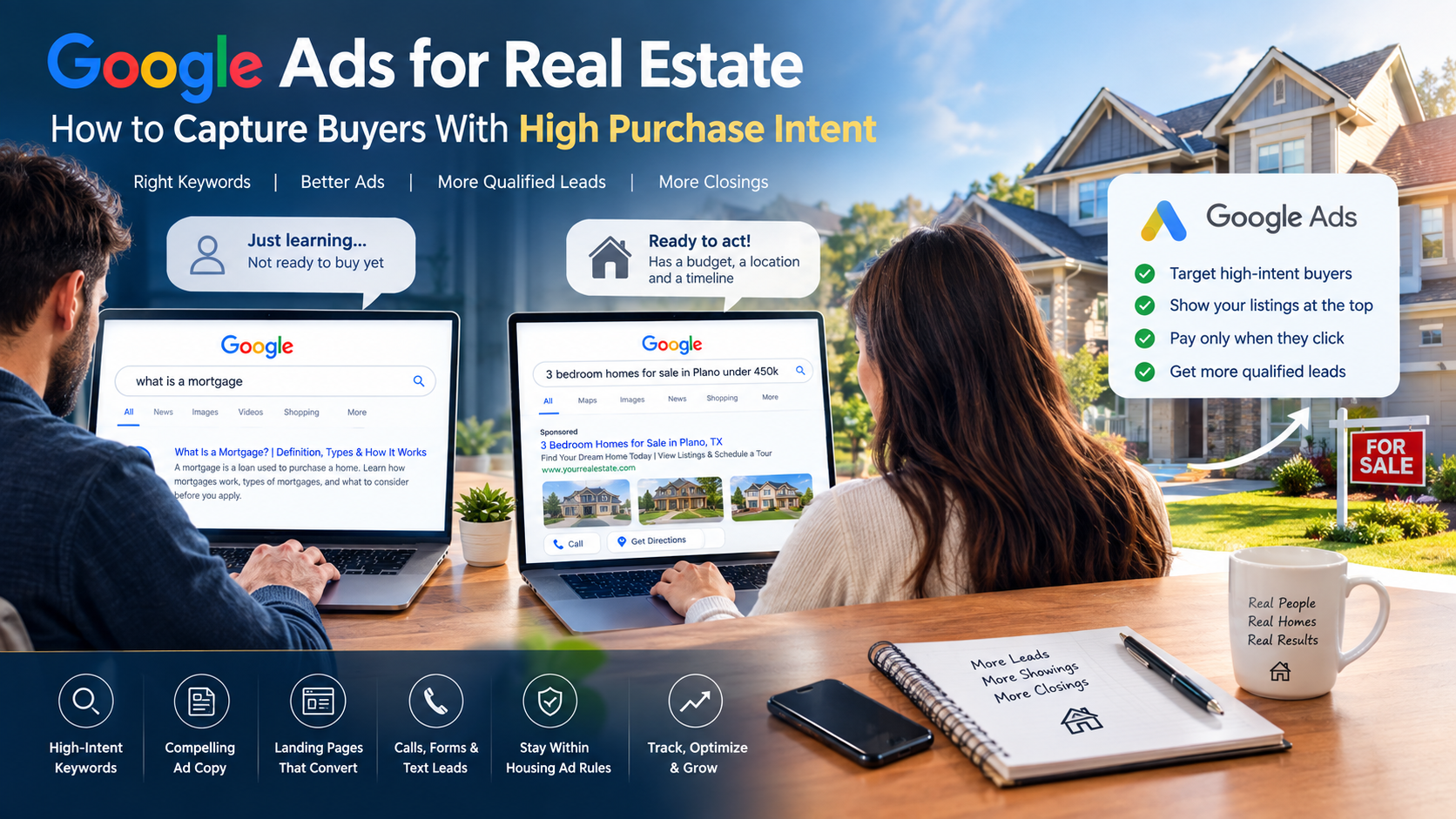
Picture two people typing into Google at the same minute.
One types “what is a mortgage.” The other types “3 bedroom homes for sale in Plano under 450k.”
Both are searching. Only one is ready to act. The second person has a budget, a place in mind, and a clock ticking in their head. That is high purchase intent, and it is exactly who Google Ads for real estate can put in front of you.
What is Google Ads for real estate?
It is a pay-per-click way to show your listings, services, or agent brand at the top of Google when a person searches for a home. You pay only when someone clicks. With the right keywords, ads, and tracking, you reach buyers who are ready to call, book a tour, or make an offer.
There is a catch, though. Clicks in this industry are not cheap, and a bad setup burns money fast. This guide shows you how to avoid that. You will learn how to find high-intent buyers, write ads they click, build pages that turn clicks into real estate leads, and follow the ad rules that apply to housing.
We wrote it in simple steps, so you can use it whether you run your own ads or manage them for a team. At HT Business Group, this is the same thinking we bring to every paid search plan.
Key Takeaways
- Buyers who search “homes for sale in [city]” are far closer to buying than buyers who search “how to buy a house.”
- Start with a small set of high-intent keywords, then grow only after you see leads.
- Track calls, forms, and (best of all) which leads become clients.
- Negative keywords protect your budget from job seekers, students, and window shoppers.
- Housing ads in the US and Canada have targeting limits, so learn them before you build.
- Judge success by cost per client, not just cost per lead.
How do you run Google Ads for real estate? Follow these 8 steps:
- Set up conversion tracking for calls and forms.
- Build a small list of high-intent keywords.
- Add negative keywords from day one.
- Write ads that match the search.
- Send clicks to a focused landing page.
- Capture leads by form, call, and text.
- Follow Google’s housing ad targeting rules.
- Set a budget, bid smart, and review every week.
Why Google Ads Works So Well for Real Estate Buyers
Most ads interrupt people. Google Ads answers people.
When someone types a search, they tell you what they want, right now. Social media ads have to create that want. Google ads only have to meet it. That is why search is a top pick for real estate PPC.
Here are four reasons it works.
1. Buyers start with a search. Home buying is a big, slow choice. People look up areas, prices, agents, and listings for weeks or months. Each search is a chance for you to show up.
2. You can appear at the exact right moment. A buyer who searches “buyer’s agent in Tampa” is asking for what you sell.
3. You control the place. You can show ads in a city, a county, or a radius around your office. Your budget goes where you can actually serve clients.
4. You get results fast. SEO is a great long game, but it takes months. Ads can bring your first leads in days. The best plans use both.
Two Buyer Groups, Two Messages
NAR’s 2025 Profile of Home Buyers and Sellers shows a split market. First-time buyers made up just 21% of buyers, the lowest share since 1981, and their median age hit a record 40. At the same time, buyers with lots of home equity are making bigger down payments.
For your ads, this means you should not use one message for everyone. First-time buyers need help and a clear path. Repeat buyers want speed, local knowledge, and a smooth move. Build ad groups and pages for each group.
What Do Real Estate Google Ads Cost? (2026 Benchmarks)
Before you spend a dollar, know what “normal” looks like.
LocaliQ’s 2026 real estate search advertising benchmarks studied nearly 900 US search campaigns from April 2025 to March 2026. The numbers below are medians from that report.
| Metric | All real estate | Residential agent | Real estate broker | Homes for sale by agent |
|---|---|---|---|---|
| Click-through rate | 7.61% | 8.00% | 7.29% | 5.87% |
| Cost per click | $3.22 | $3.19 | $3.71 | $3.90 |
| Conversion rate | 3.70% | 1.29% | 1.53% | 1.83% |
| Cost per lead | $102.51 | $157.59 | $162.39 | $142.59 |
Three things stand out.
- Costs are rising. The average cost per click went up about 27% from the year before.
- People still click. A 7.61% click rate is strong.
- A lead is not a sale. A “lead” here means a form or a call. Many will never buy from you.
LocaliQ also notes that terms like “homes for sale Houston” and “sell my house fast” can cost roughly $4 to $8 per click, but they convert at a higher rate, around 8% to 12%. That is the whole idea of this guide: pay a bit more for buyers who are ready.
Understand Buyer Intent Before You Pick a Keyword
What is buyer intent? Buyer intent is how close a searcher is to taking action. In real estate, the words they type tell you a lot.
Think of it like a house tour. A person reading a road sign is not the same as a person standing at your front door.
| Intent level | What the buyer wants | Example searches | What to do |
|---|---|---|---|
| Low (learning) | Basic answers | “how much house can I afford,” “first time buyer tips” | Skip or use for content and remarketing |
| Medium (comparing) | Options and areas | “best neighborhoods in Tampa,” “new build vs resale” | Bid low, guide them to helpful pages |
| High (ready) | A home or an agent, now | “homes for sale in Tampa,” “buyer’s agent near me,” “condos for sale downtown Tampa” | Bid strong and send to a focused page |
Start at the bottom of the table. Put your first budget on high-intent keywords. Once those work, add the middle group. Low-intent searches can wait.
Step 1: Set Up Tracking First
Most people skip this step. It is the one that decides whether your campaign gets smarter or dumber over time.
Google’s bidding tools learn from your conversions. If you only count “page views,” Google will find you page viewers. If you count real leads, it finds real leads.
What to Track
Set up a conversion for each of these:
- Form fills for tour requests, home valuations, and contact forms
- Phone calls from your ads and from your website
- Chat or text starts, if you use them
- Booked appointments, if your calendar tool can pass that back
Give the strongest actions the most weight. A booked tour matters more than a newsletter signup.
Go One Step Further: Track Lead Quality
Here is the trick that separates good accounts from great ones. Tell Google which leads turned into real clients.
Google calls this enhanced conversions for leads. It builds on offline conversion imports, which let you measure what happens after the click, such as a call or a signed agreement. Google’s help page says these uploads are moving to its Data Manager API starting June 15, 2026, so ask your developer or CRM partner to use that route.
Why does this matter? Because then Google can learn what a good lead looks like, not just any lead.
Step 2: Build a High-Intent Keyword List
Your keyword list is the heart of your real estate Google Ads campaigns. Keep it tight.
The Simple Keyword Formula
Most winning real estate keywords follow this pattern:
[What they want] + [Where they want it]
Here are keyword groups to start with. Swap in your city and neighborhoods.
Buy a home
- homes for sale in [city]
- houses for sale in [neighborhood]
- buy a house in [city]
Find an agent
- real estate agent in [city]
- buyer’s agent [city]
- best realtor near me
Property type
- condos for sale in [city]
- townhomes for sale [neighborhood]
- new construction homes [city]
Price and features
- 3 bedroom homes for sale [city]
- homes under 500k [city]
- homes with a pool [city]
Action words
- schedule a home tour [city]
- open houses this weekend [city]
Pick the Right Match Types
Google has three main keyword match types: broad, phrase, and exact.
- Broad match is the default. It reaches the most searches, including some that do not contain your words.
- Phrase match covers searches that carry the meaning of your phrase. You get reach with more control.
- Exact match is the tightest. It targets the same meaning as your keyword and nothing much beyond it.
For a new account, start with phrase and exact match on your top terms. Try broad match later, once you have solid conversion data and strong negative keywords. Broad match with weak tracking is one of the fastest ways to waste budget.
Group Keywords by Theme
Do not dump 200 keywords into one ad group. Build small groups, such as “condos in downtown” or “buyer’s agent.” Each group gets its own ads and its own page. When the search, the ad, and the page all say the same thing, buyers trust you, and Google rewards you.
Step 3: Add Negative Keywords From Day One
What are negative keywords? They are words you tell Google not to show your ads for. Google explains that they help you focus on the searches that matter to your customers.
In real estate, they are your budget’s bodyguards. Many people search real estate words for reasons that will never pay you.
Start with this list and adjust it:
- Job seekers: jobs, careers, salary, hiring, internship
- Students and learners: license, exam, course, class, school, training, how to become
- Wrong deal type: rent, rentals, apartments for rent (if you only sell)
- Do-it-yourself: free, template, form, contract, pdf
- Brand seekers you do not want: names of big listing sites, if you are not one
- Other places: cities and states you do not serve
Two rules from Google’s own help page are worth knowing. Negative keywords do not match close variants, so add plural and singular forms yourself. And too many negatives can shrink your reach, so choose with care.
Then check your search terms report every week. It shows the real searches that triggered your ads. Add new negatives as you spot waste. This one habit can save you hundreds of dollars a month.
Step 4: Write Ads That Match Buyer Intent
Your ad has one job: make the right buyer click and the wrong buyer skip.
Google Search ads today are mostly responsive search ads. You give Google up to 15 headlines and 4 descriptions, and it mixes them. Headlines can be up to 30 characters. Descriptions can be up to 90.
A Simple Ad Formula
Use these building blocks:
- Match the search. Put the city or neighborhood in a headline.
- State the benefit. What does the buyer get?
- Add proof. Reviews, years in the area, homes sold.
- Give a clear next step. Book a tour. Talk to an agent. See new listings.
Sample Ad for a Buyer’s Agent
Headlines
- Homes for Sale in Austin, TX
- See New Listings Today
- Local Buyer’s Agent Team
- Book a Free Home Tour
- Talk to a Local Agent Now
Descriptions
- Search homes in Austin with a local agent. Book a free tour and get answers same day.
- Tell us your budget and must-haves. We will send matching homes in your inbox.
Add Call Assets and Other Assets
Call assets put your phone number on your ad with a tap-to-call button. Google says not to type your number into the ad text, because that can cause a disapproval. Also note that Google removed the option to create new call ads in February 2026, so call assets are now the way to go.
Also add sitelinks (for example “New Listings,” “Meet the Team,” “Sold Homes”) and callouts (for example “Free Home Tours,” “Local Experts”). More space means more clicks.
A Fair Housing Warning for Your Copy
Describe the home, not the buyer. Words like “perfect for young families” or “ideal for singles” can point to a group of people, and that is risky in housing ads. Write about the yard, the kitchen, the layout, the commute, and the price. Have a compliance expert review your copy if you are unsure.
Step 5: Build a Real Estate Landing Page That Converts
You can write the best ad in the world and still lose the buyer on the page after the click.
Never send high-intent clicks to your homepage. Send them to a page built for that one search.
What a Strong Landing Page Has
- A headline that matches the ad. If the ad says “Homes for Sale in Austin,” the page says the same.
- Real listings or a clear search box above the fold
- A short form. Name, phone, and email is often enough. Every extra field costs you leads.
- A big call button for mobile users
- Trust proof: reviews, sold homes, your license, your face
- Fast loading. Buyers will not wait on a slow page.
- One main goal. Do not fill the page with ten different links.
Why the Page Also Affects Your Costs
Google gives each keyword a Quality Score from 1 to 10 as a health check. It looks at three things: expected click-through rate, ad relevance, and landing page experience. Google says it is a diagnostic tool, not a number to chase for its own sake. Still, if your landing page rates “below average,” that is a clear sign to fix the page.
Step 6: Capture Leads in More Than One Way
Some buyers love forms. Some hate them. Some want to call. Some want to text. Give people choices.
Lead Form Assets
Lead form assets let a person share their contact details right inside your ad, without visiting your site. You can add them to Search and Performance Max campaigns. Google says you can download leads as a CSV file, get them by email, or send them straight to your CRM with a webhook. It also says you can only download leads from the last 30 days, so set up the CRM link on day one. Check that your account is eligible for this feature before you plan around it.
Speed Wins Deals
A high-intent buyer is talking to more than one agent. The first one to answer often wins.
- Send new leads to your phone with an instant alert.
- Reply within minutes, not hours.
- Use a simple script: thank them, ask about budget and timeline, and offer a tour.
- Follow up by call, text, and email over the next few days.
Great ads cannot fix slow follow-up.
Step 7: Know the Targeting Rules for Housing Ads
This section saves people from painful policy problems.
Google limits how housing ads can be targeted in the US and Canada. The housing, employment, and credit policy says housing, employment, and credit ads can no longer be targeted by gender, age, parental status, marital status, or ZIP code. Real estate agents and brokers, and ads for a single home for sale, are named as examples of housing ads with restricted targeting.
Here is a simple way to see it, based on Google’s own FAQ on this policy.
| You cannot use | You can still use |
|---|---|
| Age, gender, and parental status targeting | Cities, counties, states, and DMA regions |
| Marital status and “recently married” audiences | Radius targeting around a location (privacy-safe radius) |
| ZIP code targeting | In-market and affinity audiences |
| Bid adjustments on those demographics | Custom intent audiences and similar segments |
| Customer lists or remarketing lists built from those signals | Remarketing and Customer Match, when the lists do not use restricted signals |
Two more points matter.
The rule follows where ads show, not where you sit. Google says enforcement focuses on the target location, not the advertiser’s billing or office address. If you run ads for US buyers from anywhere in the world, the rules still apply.
Your landing page counts. Google reviews the ad and the page. If a large part of your page is about housing, the ad can be labeled as a housing ad even if the ad text is not.
The takeaway: build your reach from location, search intent, and behavior, not from personal traits. That is better for fair housing, and it fits how search works anyway.
Step 8: Set a Smart Budget and Bidding Plan
Do the Math Before You Start
Here is a simple example. It is only an example, so plug in your own numbers.
- Monthly budget: $3,000
- Average cost per click: $3.22
- Clicks you can buy: about 930
- Conversion rate: 3.7%
- Leads: about 34
- Cost per lead: about $87
Now add one more line. If 1 in 15 leads becomes a client, that is about 2 clients, at roughly $1,300 each in ad cost. Compare that number to your average commission. That is the number that tells you if the campaign works.
Bidding Tips
- Start simple. In the first weeks, keep the keyword list small and watch the search terms.
- Move to conversion-based bidding (such as Maximize Conversions) once you have steady lead data. Many teams wait for around 30 leads in a month before they trust automation.
- Feed it good data. Automated bidding is only as smart as the conversions you count.
- Use ad schedules if you cannot answer leads at night. Or make sure your after-hours form and text follow-up work.
- Watch your impression share. If your best keywords lose to budget limits, move money from weak terms to strong ones.
Set Your Location Smartly
Use the cities, counties, or radius areas where you actually work. Do not blanket a whole state if you serve three towns. Also check the “presence” setting so you reach people in your target area, not just people who are curious about it.
Where Performance Max Fits in
Performance Max campaigns let you run ads across Google’s channels from one campaign. Google says it shifts budget to the best-performing channels, including Search, YouTube, Display, Discover, Gmail, and Maps, based on your goals and the assets you provide.
For real estate, Performance Max can add reach and show your homes in richer formats. But it gives you less control than Search. Here is a safe way to use it:
- Launch Search first. Learn which keywords and messages bring good leads.
- Clean up your conversions. Make sure Google only counts real lead actions.
- Add Performance Max next with strong photos, video, and audience signals.
- Compare lead quality, not just lead volume, between the two.
Keep your best high-intent Search campaign running on its own so you never lose control of your most important traffic.
Use Remarketing to Win Buyers Who Left
Most buyers do not act on the first visit. They look at homes for weeks.
Remarketing shows ads to people who have already visited your site. Use it to remind a buyer about a listing they viewed, invite them to a tour, or share a new home in the same area. Under Google’s housing rules, remarketing is still allowed as long as your lists are not built from restricted signals such as age, marital status, or ZIP code.
Keep it light. Two or three friendly reminders beat a flood of ads that follow people everywhere.
What to Measure (And What to Ignore)
A dashboard full of numbers can hide the truth. Focus on these:
| Metric | Why it matters |
|---|---|
| Cost per lead | Shows how cheap it is to get contact info |
| Lead-to-appointment rate | Shows if the leads are real |
| Appointment-to-client rate | Shows if your sales process works |
| Cost per client | The number that decides if ads are worth it |
| Search impression share | Shows if you are missing high-intent searches |
| Search terms report | Shows the true words buyers use |
Clicks and impressions are fine as signals, but they do not pay the bills.
Your Weekly 30-Minute Routine
- Open the search terms report and add negative keywords.
- Pause keywords with lots of clicks and no leads.
- Check which ads get the most conversions, then write new versions of the winners.
- Call five recent leads and ask how they found you. Note the quality.
- Update your offline conversions so Google learns which leads became clients.
10 Common Mistakes in Real Estate PPC
- Sending traffic to the homepage. Use focused pages.
- Skipping tracking. You cannot fix what you cannot see.
- Using only broad match. It invites wasted clicks.
- Ignoring negative keywords. Job seekers and students will drain your budget.
- Targeting too wide. Serve the areas you can actually cover.
- Long forms. Ask for the least you need.
- Slow follow-up. A lead that waits a day is often gone.
- Judging by cost per lead alone. Look at cost per client.
- Breaking housing ad rules. Learn the targeting limits before you launch.
- Setting it and forgetting it. Good accounts get checked every week.
Your 30-Day Launch Plan
Week 1: Foundation. Set goals, install tracking, and choose your areas. Build a list of 20 to 40 high-intent keywords and a starter negative list.
Week 2: Launch. Go live with two or three tight ad groups, one landing page for each, call assets, and a lead form if it fits. Watch spending daily.
Week 3: Clean up. Read the search terms report. Add negatives, pause weak terms, and test a second set of ad copy.
Week 4: Improve. Import lead results so Google can learn. Compare cost per lead and cost per client. Decide if you will scale, test Performance Max, or add remarketing.
Frequently Asked Questions About Google Ads for Real Estate
How much should I spend on Google Ads for real estate?
Start with a budget that buys enough clicks to learn from. At the 2026 average of about $3.22 per click, $2,000 a month gets you around 620 clicks. Many teams test with $1,500 to $3,000 a month, then adjust after they see cost per client.
What are the best keywords for real estate Google Ads?
The best keywords pair a buyer need with a place, such as “homes for sale in [city],” “buyer’s agent [city],” and “condos for sale [neighborhood].” These show high buyer intent. Add negative keywords to block jobs, courses, and rentals.
Is Google Ads better than Facebook ads for real estate?
They do different jobs. Google Ads catches people who are already searching, so it is strong for ready buyers. Social ads help you create interest in people who are not searching yet. Many agents start with Google and add social later.
How long does it take to get real estate leads from Google Ads?
You can see your first leads within days of launch. It often takes a few weeks to clean up keywords and pages, and longer to know your true cost per client, because deals close slowly.
Can I target real estate ads by ZIP code, age, or gender?
In the US and Canada, no. Google’s housing policy blocks targeting by age, gender, parental status, marital status, and ZIP code. Use city, county, radius, search intent, and allowed audiences instead.
What is a good cost per lead for real estate?
LocaliQ’s 2026 data shows a median of $102.51 across real estate, and about $157.59 for residential agents. A “good” number is one that leaves you profit after your close rate and commission. Track cost per client to know for sure.
Should I use Performance Max for real estate?
It can help once your Search campaigns and tracking are solid. Use it to add reach, not to replace your main high-intent Search campaign.
Final Thoughts: Turn Clicks Into Closings
Google Ads for real estate works because it puts your name in front of people at the moment they say, “I want to buy.” The winners are not the ones with the biggest budget. They are the ones with the clearest plan: high-intent keywords, tight negatives, honest ads, fast pages, careful tracking, and quick follow-up.
Start small. Track everything. Learn what a good lead looks like, then teach Google to find more of them.
If you would rather have experts build and manage this for you, HT Business Group can help. We combine paid search, landing page work, and tracking so your ad spend turns into real conversations with real buyers. Reach out today and let’s map out a Google Ads plan for your market.